Decoratorパターン
動的に機能を拡張し、柔軟に組み合わせたりできる
Decorator とは、英語で「装飾者」を意味する言葉です。Decorator パターンでは、飾り枠と中身を同一視することで、より柔軟な機能拡張方法を提供します。
クラスの持つ機能を拡張する方法としては、一般には継承か委譲が使われます。しかし、これらの方法では、拡張の順序によって、クラスどうしに不要な従属関係が生じてしまう、という問題があります。
そんなときは Composite パターンが威力を発揮します。Composite パターンは、要素であるオブジェクトと、複数の要素からなる複合オブジェクトを区別なく扱えるという特徴を持ちます。この特徴を利用することで、構造を再帰的に組み立て、クライアントからの見た目をシンプルに保つことができます。
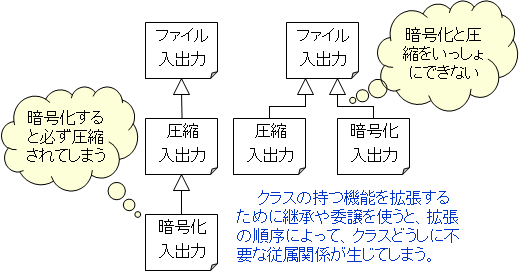
例えば、ファイルの読み書きをするFileクラスがあるとしましょう。ここで、
- 圧縮されたファイルの読み書きもできるようにする。
- 暗号化されたファイルの読み書きもできるようにする。
まず、Fileクラスを拡張して、圧縮機能を持ったクラスを作ったとしましょう。
次に、暗号化機能を持ったクラスを作ります。 Fileクラスを継承して作ることもできますが、そうすると、圧縮されて、かつ暗号化されたファイルは、読み書きできなくなってしまいます。
かといって、圧縮機能を持ったクラスを更に継承して作ると、今度は圧縮しないで暗号化することができなくなってしまいます。

Decoratorパターンの利点は、拡張の組み合わせや順序が自由に決められる点です。飾り枠を使って中身を包んでも、インタフェースはは少しも隠されません。クラスの持つメソッドは他のクラスから見ることができます。これをインタフェースが「透過的」であるといいます。すなわち、飾り枠をたくさん使って包んでも、インタフェースはまったく変更されないのです。ですから、 Decoratorパターンは、拡張の組み合わせや順序が自由に決められるのです。
インタフェースが「透過的」であるため、 Decoratorパターンでは、Compositeパターンに似た再帰的な構造が登場します。すなわち、「飾り枠」が保持している「中身」が、実際には別のものの「飾り枠」になったいるという構造です。 DecoratorパターンとCompositeパターンは、再帰的な構造を扱うという点では似ていますが、目的は異なります。 Decoratorパターンは、外枠を重ねるということで機能を追加していく点に主眼があるからです。
例題
AAAAA
BBB
文字列を修飾して表示するクラスを作成しなさい。
ひとつは SideBorder で、文字列の両側に、指定文字をつけます。もうひとつは FullBorder で、文字列の周りを罫線で囲みます。また、これらを組み合わせて何回も修飾できるようにします。
|
SideBorder (%で囲む) %AAAAA% %BBB% |
組み合わせ +-------+
|%AAAAA%| |%BBB% | +-------+ | |
|
FullBorder +-----+
|AAAAA| |BBB | +-----+ |
|
Decoratorパターンを使用しない例 AbstractDisplay.java public abstract class AbstractDisplay {
protected String[] str;
protected int height;
protected int width;
public AbstractDisplay() {}
public AbstractDisplay(String[] str) {
height = str.length;
this.str = new String[height];
for (int i = 0; i < height; i++)
this.str[i] = str[i];
width = getCharCount();
}
public abstract String getLine(int n);
public abstract int getLineCount();
private int getCharCount() {
int cnt = 0;
for (int i = 0 ; i < str.length ; i++) {
if (cnt < str[i].getBytes().length)
cnt = str[i].getBytes().length;
}
return cnt;
}
public final void show() {
for (int i = 0 ; i < getLineCount() ; i++) {
System.out.println(getLine(i));
}
}
}
SideBorder.java public class SideBorder extends AbstractDisplay {
private char border;
public SideBorder(String[] str, char border) {
super(str);
this.border = border;
}
public String getLine(int n) {
return border + str[n] + border;
}
public int getLineCount() {
return str.length;
}
}
FullBorder.java public class FullBorder extends AbstractDisplay {
public FullBorder(String[] str) {
super(str);
}
public String getLine(int n) {
if (n == 0 || n == getLineCount() - 1)
return "+" + repeat("-", width) + "+";
else {
String str = this.str[n - 1];
return "|" + str + repeat(" ", width - str.length()) + "|";
}
}
public int getLineCount() {
return str.length + 2;
}
private String repeat(String str, int count) {
StringBuilder b = new StringBuilder(str.length() * count);
while(count-- > 0)
b.append(str);
return b.toString();
}
}
Main.java public class Main {
public static void main(String[] args) {
String[] str = {"AAAAA", "BBB"};
SideBorder s1 = new SideBorder(str, '%');
s1.show();
FullBorder s2 = new FullBorder(str);
s2.show();
}
}
|
Decoratorパターンを使用した例 AbstractDisplay.java public abstract class AbstractDisplay {
protected AbstractDisplay disp;
protected int height;
protected int width;
protected AbstractDisplay() { }
protected AbstractDisplay(AbstractDisplay disp) {
this.disp = disp;
}
protected int getCharCount() {
return width;
}
protected int getLineCount() {
return height;
}
protected abstract String getLine(int n);
public final void show() {
for (int i = 0 ; i < getLineCount() ; i++) {
System.out.println(getLine(i));
}
}
}
SimpleText.java public class SimpleText extends AbstractDisplay {
private String[] str;
public SimpleText(String[] str) {
int height = str.length;
this.str = new String[height];
width = 0;
for (int i = 0; i < height; i++)
{
this.str[i] = str[i];
if (width < str[i].length())
width = str[i].length();
}
this.height = height;
}
protected String getLine(int n) {
return str[n];
}
}
SideBorder.java public class SideBorder extends AbstractDisplay {
private char border;
public SideBorder(AbstractDisplay disp, char border) {
super(disp);
this.border = border;
width = disp.getCharCount() + 2;
height = disp.getLineCount();
}
protected String getLine(int n) {
return border + disp.getLine(n) + border;
}
}
FullBorder.java public class FullBorder extends AbstractDisplay {
public FullBorder(AbstractDisplay disp) {
super(disp);
width = disp.getCharCount();
height = disp.getLineCount() + 2;
}
protected String getLine(int n) {
if (n == 0 || n == height - 1)
return "+" + repeat("-", width) + "+";
else {
String str = disp.getLine(n - 1);
return "|" + str + repeat(" ", width - str.length()) + "|";
}
}
private String repeat(String str, int count) {
StringBuilder b = new StringBuilder(str.length() * count);
while(count-- > 0)
b.append(str);
return b.toString();
}
}
Main.java public class Main {
public static void main(String[] args) {
String[] str = new String[] { "AAAAA", "BBB" };
AbstractDisplay d1 = new SimpleText(str);
AbstractDisplay d2 = new SideBorder(d1, '%');
d2.show();
AbstractDisplay d3 = new FullBorder(d2);
d3.show();
}
}
|
|
まずは、Decorator パターンを意識せずに、2種類のクラスを作成してみましょう。SideBorder は、与えられた文字列に指定の文字をつけます。FullBorder は、与えられた文字列の周りを罫線で囲みます。 ともに、引数としてString 型が与えられます。よって、SideBorder と FullBorder の組み合わせ、つまり SideBorder の結果を FullBorder に与えるとか、その逆ができません。 (SideBorder の結果は、Display 型です。) |
Decorator パターンでは、 SideBorder も FullBorder もともに引数として AbstractDisplay 型を受け取ります。つまり、 SideBorder や FullBorder の結果をそのまま受け取ることができるのです。いったん、SimpleText によって String 型を AbstractDisplay 型にすれば、文字列の両側に ‘%’ をつけ、さらに罫線で囲って、また、全体の 両側に ‘$’ をつけるということができるようになるわけです。 Decorator パターンでは、委譲が使われています。「飾り枠」に対して行われた要求(メソッドの呼び出し)は、その「中身」に処理の実行が依頼されます。この例では、SideBorder や FullBorder の コンストラクタで disp.getCharCount() と disp.getLineCount() を呼び出し、中身の文字数や行数を求めています。(disp が中身のインスタンス) Decorator パターンを使うと、多様な機能追加を行うことができます。具体的な「飾り枠」をたくさん用意しておけば、それらを自由に組み合わせて新しいオブジェクトを作ることができるからです。その際、個々の飾り枠は単純でもかまいません。組み合わせていけば複雑なものも作れるからです。ただし、このせいで、よく似ている小さなクラスがたくさん作られてしまうという欠点もあります。 |
|
Decoratorパターンを使用しない例 abstractDisplay.h #include <string>
class AbstractDisplay
{
private:
int getCharCount();
protected:
std::string* str;
int height;
int width;
virtual std::string getLine(int) = 0;
public:
AbstractDisplay(void);
AbstractDisplay(std::string*, int);
virtual ~AbstractDisplay(void);
virtual int getLineCount(void) = 0;
void show(void);
}; abstractDisplay.cpp #include <iostream>
using namespace std;
#include "abstractDisplay.h"
AbstractDisplay::AbstractDisplay(void) {}
AbstractDisplay::AbstractDisplay(string* str, int height) {
this->height = height;
this->str = new string[height];
for (int i = 0 ; i < height ; i++)
this->str[i] = str[i];
width = getCharCount();
}
AbstractDisplay::~AbstractDisplay(void) {
delete[] str;
}
int AbstractDisplay::getCharCount(void) {
unsigned int cnt = 0;
for (int i = 0 ; i < height ; i++) {
if (cnt < str[i].length())
cnt = str[i].length();
}
return cnt;
}
void AbstractDisplay::show(void) {
for (int i = 0 ; i < getLineCount() ; i++)
cout < getLine(i) < endl;
} sideBorder.h #include <string>
#include "abstractDisplay.h"
class SideBorder : public AbstractDisplay
{
private:
char border;
protected:
std::string getLine(int);
public:
SideBorder(void);
SideBorder(std::string*, int, char);
virtual ~SideBorder(void);
int getLineCount(void);
}; sideBorder.cpp #include "sideBorder.h"
using namespace std;
SideBorder::SideBorder(void) {}
SideBorder::SideBorder(string* str, int height, char border)
: AbstractDisplay(str, height) {
this->border = border;
}
SideBorder::~SideBorder(void) {}
int SideBorder::getLineCount(void) { return height; }
string sideBorder::getLine(int n) {
return border + str[n] + border;
} fullBorder.h #include <string>
#include "abstractDisplay.h"
class FullBorder : public AbstractDisplay
{
protected:
std::string getLine(int);
public:
FullBorder(void);
FullBorder(std::string*, int);
virtual ~FullBorder(void);
int getLineCount(void);
}; fullBorder.cpp #include "fullBorder.h"
using namespace std;
FullBorder::FullBorder(void) {}
FullBorder::FullBorder(string* str, int height) : AbstractDisplay(str, height) {}
FullBorder::~FullBorder(void) {}
int FullBorder::getLineCount(void) { return height + 2; }
string FullBorder::getLine(int n) {
if (n == 0 || n == getLineCount() - 1)
return "+" + string(width, '-') + "+";
else
return "|" + str[n-1] + string(width - str[n-1].length(), ' ') + "|";
} main.cpp using namespace std;
#include "sideBorder.h"
#include "fullBorder.h"
int main() {
string str[] = {"AAAAA", "BBB"};
SideBorder s1(str, 2, '%');
s1.show();
FullBorder s2(str, s1.getLineCount());
s2.show();
return 0;
}
|
Decoratorパターンを使用した例 abstractDisplay.h #include <string>
class AbstractDisplay
{
protected:
AbstractDisplay* disp;
unsigned int height;
unsigned int width;
int getCharCount(void);
int getLineCount(void);
virtual std::string getLine(int) = 0;
public:
AbstractDisplay(void);
AbstractDisplay(AbstractDisplay*);
virtual ~AbstractDisplay(void);
void show(void);
}; abstractDisplay.cpp #include <iostream>
using namespace std;
#include "abstractDisplay.h"
AbstractDisplay::AbstractDisplay(void) {}
AbstractDisplay::AbstractDisplay(AbstractDisplay* disp) : disp(disp) {}
AbstractDisplay::~AbstractDisplay(void) {}
int AbstractDisplay::getCharCount() {
return width;
}
int AbstractDisplay::getLineCount() {
return height;
}
void AbstractDisplay::show(void) {
for (int i = 0 ; i < getLineCount() ; i++)
cout << getLine(i) << endl;
} simpleText.h #include <string>
#include "abstractDisplay.h"
class SimpleText : public AbstractDisplay
{
private:
std::string* str;
protected:
std::string getLine(int);
public:
SimpleText(void);
SimpleText(std::string*, int);
virtual ~SimpleText(void);
}; simpleText.cpp #include "simpleText.h"
using namespace std;
SimpleText::SimpleText(void) {}
SimpleText::SimpleText(string* str, int height) {
this->str = new string[height];
width = 0;
for (int i = 0 ; i < height ; i++) {
this->str[i] = str[i];
if (width < str[i].length())
width = str[i].length();
}
this->height = height;
}
SimpleText::~SimpleText(void) {
delete[] str;
}
string SimpleText::getLine(int n) {
return str[n];
} sideBorder.h #include <string>
#include "display.h"
class SideBorder : public AbstractDisplay
{
private:
char border;
protected:
std::string getLine(int);
public:
SideBorder(void);
SideBorder(AbstractDisplay*, char);
virtual ~SideBorder(void);
}; sideBorder.cpp #include "sideBorder.h"
using namespace std;
SideBorder::SideBorder(void) {}
SideBorder::SideBorder(AbstractDisplay* disp, char border) : AbstractDisplay(disp) {
this->border = border;
width = disp->getCharCount() + 2;
height = disp->getLineCount();
}
SideBorder::~SideBorder(void) {}
string SideBorder::getLine(int (n) {
return border + disp->getLine(n) + border;
} fullBorder.h #include <string>
#include "display.h"
class FullBorder : public AbstractDisplay
{
protected:
std::string getLine(int);
public:
FullBorder(void);
FullBorder(AbstractDisplay*);
virtual ~FullBorder(void);
}; fullBorder.cpp #include "fullBorder.h"
using namespace std;
FullBorder::FullBorder(void) {}
FullBorder::FullBorder(AbstractDisplay* disp) : AbstractDisplay(disp) {
width = disp->getCharCount() + 2;
height = disp->getLineCount() + 2;
}
FullBorder::~FullBorder(void) {}
string FullBorder::getLine(int n) {
if (n == 0 || n == height - 1)
return "+" + string(width - 2, '-') + "+";
else {
string str = disp->getLine(n-1);
return "|" + str + string(width - str.length() - 2, ' ') + "|";
}
} main.cpp using namespace std;
#include "simpleText.h"
#include "sideBorder.h"
#include "fullBorder.h"
int main() {
string str[] = {"AAAAA", "BBB"};
SimpleText d1(str, 2);
d1.show();
SideBorder d2(&d1, '%');
d2.show();
FullBorder d3(&d2);
d3.show();
return 0;
}
|
|
まずは、Decorator パターンを意識せずに、2種類のクラスを作成してみましょう。SideBorder は、与えられた文字列に指定の文字をつけます。FullBorder は、与えられた文字列の周りを罫線で囲みます。 ともに、引数としてstring 型が与えられます。よって、 SideBorder の結果を FullBorder に与えるとか、その逆ができません。 (SideBorder の結果は、AbstractDisplay 型です。) |
Decorator パターンでは、SideBorder も FullBorder もともに引数として AbstractDisplay 型を受け取ります。つまり、SideBorder や FullBorder の結果をそのまま受け取ることができるのです。いったん、SimpleText によって string 型を AbstractDisplay 型にすれば、文字列の両側に ‘%’ をつけ、さらに罫線で囲って、また、全体の 両側に ‘$’ をつけるということができるようになるわけです。 Decorator パターンでは、委譲が使われています。「飾り枠」に対して行われた要求(メソッドの呼び出し)は、その「中身」に処理の実行が依頼されます。この例では、SideBorder や FullBorder の コンストラクタで disp->getCharCount() と disp->GetLineCount() を呼び出し、中身の文字数や行数を求めています。(disp が中身のインスタンス) Decorator パターンを使うと、多様な機能追加を行うことができます。具体的な「飾り枠」をたくさん用意しておけば、それらを自由に組み合わせて新しいオブジェクトを作ることができるからです。その際、個々の飾り枠は単純でもかまいません。組み合わせていけば複雑なものも作れるからです。ただし、このせいで、よく似ている小さなクラスがたくさん作られてしまうという欠点もあります。 |
|
Decoratorパターンを使用しない例 AbstractDisplay.cs abstract class AbstractDisplay
{
protected string[] str;
protected int height;
protected int width;
public AbstractDisplay(string[] str)
{
height = str.Length;
this.str = new string[height];
for (int i = 0; i < height; i++)
this.str[i] = str[i];
width = GetCharCount();
}
public abstract string GetLine(int n);
public abstract int GetLineCount();
public void Show()
{
for (int i = 0; i < GetLineCount(); i++)
{
Console.WriteLine(GetLine(i));
}
}
private int GetCharCount()
{
int cnt = 0;
for (int i = 0; i < str.Length; i++)
{
if (cnt < str[i].Length)
cnt = str[i].Length;
}
return cnt;
}
} SideBorder.cs class SideBorder : AbstractDisplay
{
private char border;
public SideBorder(string[] str, char border) : base(str)
{
this.border = border;
}
public override string GetLine(int n)
{
return border + str[n] + border;
}
public override int GetLineCount()
{
return str.Length;
}
} FullBorder.cs class FullBorder : AbstractDisplay
{
public FullBorder(string[] str) : base(str) {}
public override string GetLine(int n)
{
if (n == 0 || n == GetLineCount() - 1)
return "+".PadRight(width + 1, '-') + "+";
else {
string str = this.str[n - 1];
return "|" + str.PadRight(width, ' ') + "|";
}
}
public override int GetLineCount()
{
return str.Length + 2;
}
} Program.cs class Program
{
static void Main(string[] args)
{
string[] str = new string[] { "AAAAA", "BBB" };
SideBorder s1 = new SideBorder(str, '%');
s1.Show();
FullBorder s2 = new FullBorder(str);
s2.Show();
}
}
|
Decoratorパターンを使用した例 AbstractDisplay.cs abstract class AbstractDisplay
{
protected AbstractDisplay disp;
protected int height;
protected int width;
protected AbstractDisplay() { }
protected AbstractDisplay(AbstractDisplay disp) {
this.disp = disp;
}
protected int GetCharCount()
{
return width;
}
public int GetLineCount()
{
return height;
}
public abstract string GetLine(int n);
public void Show()
{
for (int i = 0; i < GetLineCount(); i++)
{
Console.WriteLine(GetLine(i));
}
}
} SimpleText.cs class SimpleText : AbstractDisplay
{
private string[] str;
public SimpleText(string[] str)
{
int height = str.Length;
this.str = new string[height];
width = 0;
for (int i = 0; i < height; i++)
{
this.str[i] = str[i];
if (width < str[i].Length)
width = str[i].Length;
}
this.height = height;
}
public override string GetLine(int n)
{
return str[n];
}
} SideBorder.cs class SideBorder : AbstractDisplay
{
private char border;
public SideBorder(AbstractDisplay disp, char border) : base(disp)
{
this.border = border;
width = disp.GetCharCount() + 2;
height = disp.GetLineCount();
}
public override string GetLine(int n)
{
return border + border.GetLine(n) + border;
}
} FullBorder.cs class FullBorder : AbstractDisplay
{
public FullBorder(AbstractDisplay disp) : base(disp)
{
width = disp.GetCharCount();
height = disp.GetLineCount() + 2;
}
public override string GetLine(int n)
{
if (n == 0 || n == height - 1)
return "+".PadRight(width + 1, '-') + "+";
else
{
string str = disp.GetLine(n - 1);
return "|" + str.PadRight(width, ' ') + "|";
}
}
} Program.cs class Program
{
static void Main(string[] args)
{
string[] str = new string[] { "AAAAA", "BBB" };
AbstractDisplay d1 = new SimpleText(str);
d1.Show();
AbstractDisplay d2 = new SideBorder(d1, '%');
d2.Show();
AbstractDisplay d3 = new FullBorder(d2);
d3.Show();
}
}
|
|
まずは、Decorator パターンを意識せずに、2種類のクラスを作成してみましょう。SideBorder は、与えられた文字列に指定の文字をつけます。FullBorder は、与えられた文字列の周りを罫線で囲みます。 ともに、引数としてString 型が与えられます。よって、SideBorder と FullBorder の組み合わせ、つまり SideBorder の結果を FullBorder に与えるとか、その逆ができません。 (SideBorder の結果は、AbstractDisplay 型です。) |
Decorator パターンでは、 SideBorder も FullBorder もともに引数として AbstractDisplay 型を受け取ります。つまり、 SideBorder や FullBorder の結果をそのまま受け取ることができるのです。いったん、SimpleText によって String 型を AbstractDisplay 型にすれば、文字列の両側に ‘%’ をつけ、さらに罫線で囲って、また、全体の 両側に ‘$’ をつけるということができるようになるわけです。 Decorator パターンでは、委譲が使われています。「飾り枠」に対して行われた要求(メソッドの呼び出し)は、その「中身」に処理の実行が依頼されます。この例では、SideBorder や FullBorder の コンストラクタで disp.GetCharCount() と disp.GetLineCount() を呼び出し、中身の文字数や行数を求めています。(disp が中身のインスタンス) Decorator パターンを使うと、多様な機能追加を行うことができます。具体的な「飾り枠」をたくさん用意しておけば、それらを自由に組み合わせて新しいオブジェクトを作ることができるからです。その際、個々の飾り枠は単純でもかまいません。組み合わせていけば複雑なものも作れるからです。ただし、このせいで、よく似ている小さなクラスがたくさん作られてしまうという欠点もあります。 |
|
Decoratorパターンを使用しない例 AbstractDisplay.vb Public MustInherit Class AbstractDisplay
Protected str As String()
Protected height As Integer
Protected width As Integer
Public Sub New(str As String())
height = str.Length
Me.str = New String(height - 1) {}
For i As Integer = 0 To height - 1
Me.str(i) = str(i)
Next
width = GetCharCount()
End Sub
Protected MustOverride Function GetLine(ByVal n As Integer) As String
Protected MustOverride Function GetLineCount() As Integer
Protected Function GetCharCount() As Integer
Dim cnt As Integer = 0
For i As Integer = 0 To str.Length - 1
If cnt < str(i).Length Then
cnt = str(i).Length
End If
Next
Return cnt
End Function
Public Sub Show()
For i As Integer = 0 To getLineCount() - 1
Console.WriteLine(getLine(i))
Next
End Sub
End Class
SideBorder.vb Public Class SideBorder
Inherits AbstractDisplay
Private border As Char
Public Sub New(ByVal str As String(), ByVal border As Char)
MyBase.New(str)
Me.border = border
End Sub
Public Overrides Function GetLine(ByVal n As Integer) As String
Return border & str(n) & border
End Function
Public Overrides Function GetLineCount() As Integer
Return str.Length
End Function
End Class
FullBorder.vb Public Class FullBorder
Inherits AbstractDisplay
Public Sub New(ByVal str As String())
MyBase.New(str)
End Sub
Public Overrides Function GetLine(ByVal n As Integer) As String
If n = 0 OrElse n = GetLineCount() - 1 Then
Return "+".PadRight(width + 1, "-") & "+"
Else
Dim str As String = Me.str(n - 1)
Return "|" & str.PadRight(width, " "c) & "|"
End If
End Function
Public Overrides Function GetLineCount() As Integer
Return str.Length + 2
End Function
End Class
Program.vb Module Main
Sub Main()
Dim str As String() = New String() {"AAAAA", "BBB"}
Dim s1 As SideBorder = New SideBorder(str, "%"c)
s1.Show()
Dim s2 As FullBorder = New FullBorder(str)
s2.Show()
End Sub
End Module
|
Decoratorパターンを使用した例 AbstractDisplay.vb Public MustInherit Class AbstractDisplay
Protected disp As AbstractDisplay
Protected height As Integer
Protected width As Integer
Public Sub New()
End Sub
Public Sub New(disp As AbstractDisplay)
Me.disp = disp
End Sub
Public Function GetCharCount() As Integer
Return width
End Function
Public Function GetLineCount() As Integer
Return height
End Function
Public MustOverride Function GetLine(ByVal n As Integer) As String
Public Sub Show()
For i As Integer = 0 To GetLineCount() - 1
Console.WriteLine(GetLine(i))
Next
End Sub
End Class
SimpleText.vb Public Class SimpleText
Inherits AbstractDisplay
Private str As String()
Public Sub New(str As String())
Dim height As Integer = str.Length
Me.str = New String(height) {}
width = 0
For i As Integer = 0 To height - 1
Me.str(i) = str(i)
If width < str(i).Length Then
width = str(i).Length
End If
Next
Me.height = height
End Sub
Public Overrides Function GetLine(n As Integer) As String
Return str(n)
End Function
End Class
SideBorder.vb Public Class SideBorder
Inherits AbstractDisplay
Private border As Char
Public Sub New(ByVal disp As AbstractDisplay, ByVal border As Char)
MyBase.New(disp)
Me.border = border
width = disp.GetCharCount() + 2
height = disp.GetLineCount()
End Sub
Public Overrides Function GetLine(ByVal n As Integer) As String
Return border & disp.GetLine(n) & border
End Function
End Class
FullBorder.vb Public Class FullBorder
Inherits AbstractDisplay
Public Sub New(ByVal disp As AbstractDisplay)
MyBase.New(disp)
width = disp.GetCharCount()
height = disp.GetLineCount() + 2
End Sub
Public Overrides Function GetLine(ByVal n As Integer) As String
If n = 0 OrElse n = height - 1 Then
Return "+".PadRight(width + 1, "-"c) & "+"
Else
Dim str As String = disp.GetLine(n - 1)
Return "|" & str.PadRight(width, " "c) & "|"
End If
End Function
End Class
Program.vb Module Main
Sub Main()
Dim str As String() = New String() {"AAAAA", "BBB"}
Dim d1 As AbstractDisplay = New SimpleText(str)
d1.Show()
Dim d2 As AbstractDisplay = New SideBorder(d1, "%"c)
d2.Show()
Dim d3 As AbstractDisplay = New FullBorder(d2)
d3.Show()
End Sub
End Module
|
|
まずは、Decorator パターンを意識せずに、2種類のクラスを作成してみましょう。SideBorder は、与えられた文字列に指定の文字をつけます。FullBorder は、与えられた文字列の周りを罫線で囲みます。 ともに、引数としてString 型が与えられます。よって、SideBorder と FullBorder の組み合わせ、つまり SideBorder の結果を FullBorder に与えるとか、その逆ができません。 (SideBorder の結果は、AbstractDisplay 型です。) |
Decorator パターンでは、 SideBorder も FullBorder もともに引数として AbstractDisplay 型を受け取ります。つまり、 SideBorder や FullBorder の結果をそのまま受け取ることができるのです。いったん、SimpleText によって String 型を AbstractDisplay 型にすれば、文字列の両側に ‘%’ をつけ、さらに罫線で囲って、また、全体の 両側に ‘$’ をつけるということができるようになるわけです。 Decorator パターンでは、委譲が使われています。「飾り枠」に対して行われた要求(メソッドの呼び出し)は、その「中身」に処理の実行が依頼されます。この例では、SideBorder や FullBorder の コンストラクタで disp.GetCharCount() と disp.GetLineCount() を呼び出し、中身の文字数や行数を求めています。(disp が中身のインスタンス) Decorator パターンを使うと、多様な機能追加を行うことができます。具体的な「飾り枠」をたくさん用意しておけば、それらを自由に組み合わせて新しいオブジェクトを作ることができるからです。その際、個々の飾り枠は単純でもかまいません。組み合わせていけば複雑なものも作れるからです。ただし、このせいで、よく似ている小さなクラスがたくさん作られてしまうという欠点もあります。 |
|
Decoratorパターンを使用しない例 AbstractDisplay.js module.exports = class AbstractDisplay {
constructor(str) {
this.height = str.length;
this.str = new Array(this.height);
for (let i = 0; i < this.height; i++)
this.str[i] = str[i];
this.width = this.getCharCount();
}
getLine() {
console.log("getLine メソッドを定義してください。");
}
getLineCount() {
console.log("getLineCount メソッドを定義してください。");
}
getCharCount() {
let cnt = 0;
for (let i = 0 ; i < this.str.length ; i++) {
if (cnt < this.str[i].length)
cnt = this.str[i].length;
}
return cnt;
}
show() {
for (let i = 0 ; i < this.getLineCount() ; i++) {
process.stdout.write(this.getLine(i));
}
}
}
SideBorder.js const AbstractDisplay = require("./AbstractDisplay.js");
module.exports = class SideBorder extends AbstractDisplay {
constructor(str, border) {
super(str);
this.border = border;
}
getLine(n) {
return this.border + this.str[n] + this.border + "\n";
}
getLineCount() {
return this.str.length;
}
}
FullBorder.js const AbstractDisplay = require("./AbstractDisplay.js");
module.exports = class FullBorder extends AbstractDisplay {
constructor(str) {
super(str);
}
getLine(n) {
if (n == 0 || n == this.getLineCount() - 1)
return "+" + "-".repeat(width) + "+\n";
else {
let str = this.str[n - 1];
return "|" + str + " ".repeat(this.width - str.length) + "|\n";
}
}
getLineCount() {
return this.str.length + 2;
}
}
Main.js const SideBorder = require("./SideBorder.js");
const FullBorder = require("./FullBorder.js");
let str = ["AAAAA", "BBB"];
let s1 = new SideBorder(str, '%');
s1.show();
let s2 = new FullBorder(str);
s2.show();
|
Decoratorパターンを使用した例 AbstractDisplay.js module.exports = class AbstractDisplay {
constructor(disp) {
this.disp = disp;
}
getLine() {
console.log("getLine メソッドを定義してください。");
}
getCharCount() {
return this.width;
}
getLineCount() {
return this.height;
}
show() {
for (let i = 0 ; i < this.getLineCount() ; i++) {
process.stdout.write(this.getLine(i) + "\n");
}
}
}
SimpleText.js const AbstractDisplay = require("./AbstractDisplay.js");
module.exports = class SimpleText extends AbstractDisplay {
constructor(str) {
super(null);
let height = str.length;
this.str = new Array(height);
this.width = 0;
for (let i = 0; i < height; i++)
{
this.str[i] = str[i];
if (this.width < str[i].length)
this.width = str[i].length;
}
this.height = height;
}
getLine(n) {
return this.str[n];
}
}
SideBorder.js const AbstractDisplay = require("./AbstractDisplay.js");
module.exports = class SideBorder extends AbstractDisplay {
constructor(disp, border) {
super(disp);
this.border = border;
this.width = disp.getCharCount() + 2;
this.height = disp.getLineCount();
}
getLine(n) {
return this.border + this.disp.getLine(n) + this.border;
}
}
FullBorder.js const AbstractDisplay = require("./AbstractDisplay.js");
module.exports = class FullBorder extends AbstractDisplay {
constructor(disp) {
super(disp);
this.width = disp.getCharCount();
this.height = disp.getLineCount() + 2;
}
getLine(n) {
if (n == 0 || n == this.height - 1)
return "+" + "-".repeat(this.width) + "+\n";
else {
let str = this.disp.getLine(n - 1);
return "|" + str + " ".repeat(this.width - str.length) + "|\n";
}
}
}
Main.js const SimpleText = require("./SimpleText.js");
const SideBorder = require("./SideBorder.js");
const FullBorder = require("./FullBorder.js");
let str = ["AAAAA", "BBB"];
let d1 = new SimpleText(str);
let d2 = new SideBorder(d1, '%');
d2.show();
let d3 = new FullBorder(d2);
d3.show();
|
|
まずは、Decorator パターンを意識せずに、2種類のクラスを作成してみましょう。SideBorder は、与えられた文字列に指定の文字をつけます。FullBorder は、与えられた文字列の周りを罫線で囲みます。 ともに、引数としてString 型が与えられます。よって、SideBorder と FullBorder の組み合わせ、つまり SideBorder の結果を FullBorder に与えるとか、その逆ができません。 (SideBorder の結果は、Display 型です。) |
Decorator パターンでは、 SideBorder も FullBorder もともに引数として AbstractDisplay 型を受け取ります。つまり、 SideBorder や FullBorder の結果をそのまま受け取ることができるのです。いったん、SimpleText によって String 型を AbstractDisplay 型にすれば、文字列の両側に ‘%’ をつけ、さらに罫線で囲って、また、全体の 両側に ‘$’ をつけるということができるようになるわけです。 Decorator パターンでは、委譲が使われています。「飾り枠」に対して行われた要求(メソッドの呼び出し)は、その「中身」に処理の実行が依頼されます。この例では、SideBorder や FullBorder の コンストラクタで disp.getCharCount() と disp.getLineCount() を呼び出し、中身の文字数や行数を求めています。(disp が中身のインスタンス) Decorator パターンを使うと、多様な機能追加を行うことができます。具体的な「飾り枠」をたくさん用意しておけば、それらを自由に組み合わせて新しいオブジェクトを作ることができるからです。その際、個々の飾り枠は単純でもかまいません。組み合わせていけば複雑なものも作れるからです。ただし、このせいで、よく似ている小さなクラスがたくさん作られてしまうという欠点もあります。 |
|
Decoratorパターンを使用しない例 AbstractDisplay.pm package AbstractDisplay {
sub new {
my ($class, $str) = @_;
my $height = @{$str};
my $this = { height => $height, str => $str };
bless $this, $class;
$this->{width} = $this->getCharCount();
return $this;
}
sub getLine {
print "getLine メソッドを定義してください。";
}
sub getLineCount {
print "getLineCount メソッドを定義してください。";
}
sub getCharCount() {
my ($this) = @_;
my $cnt = 0;
for my $str (@{$this->{str}}) {
if ($cnt < length $str) {
$cnt = length $str;
}
}
return $cnt;
}
sub show {
my ($this) = @_;
for my $i ( 0 .. $this->getLineCount() - 1 ) {
print $this->getLine($i);
}
}
}
1;
SideBorder.pm package SideBorder {
use base qw(AbstractDisplay);
sub new {
my ($class, $str, $border) = @_;
my $this = $class->SUPER::new($str);
$this->{border} = $border;
return bless $this, $class;
}
sub getLineCount {
my ($this) = @_;
return @{$this->{str}};
}
sub getLine {
my ($this, $n) = @_;
return $this->{border} . $this->{disp}->getLine($n) . $this->{border} . "\n";
}
}
1;
FullBorder.pm package FullBorder {
use base qw(AbstractDisplay);
sub new {
my ($class, $str) = @_;
my $this = $class->SUPER::new($str);
return bless $this, $class;
}
sub getLine {
my ($this, $n) = @_;
if ($n == 0 || $n == $this->getLineCount() - 1) {
return "+" . "-" x $this->{width} . "+\n";
}
else {
my $str = $this->{str}[$n - 1];
return "|" . $str . " " x ($this->{width} - length $str) . "|";
}
}
sub getLineCount() {
my ($this) = @_;
return @{$this->{str}} + 2;
}
}
1;
Main.pl use lib qw(./);
use SideBorder;
use FullBorder;
my @str = ("AAAAA", "BBB");
my $s1 = new SideBorder(\@s1, '%');
$s1->show();
my $s2 = new FullBorder(\@s2);
$d2->show();
|
Decoratorパターンを使用した例 AbstractDisplay.pm package AbstractDisplay {
sub new {
my ($class, $disp) = @_;
my $this = { disp => $disp };
return bless $this, $class;
}
sub getLine {
print "getLine メソッドを定義してください。";
}
sub getCharCount() {
my ($this) = @_;
return $this->{width};
}
sub getLineCount {
my ($this) = @_;
return $this->{height};
}
sub show {
my ($this) = @_;
for my $i ( 0 .. $this->getLineCount() - 1 ) {
print $this->getLine($i) . "\n";
}
}
}
1;
SimpleText.pm package SimpleText {
sub new {
my ($class, $str) = @_;
my $this = $class->SUPER::new();
my $height = @{$str};
$this->{str} = ();
$this->{width} = 0;
for my $str (@{$str}) {
push @{$this->{str}}, $str;
if ($this->{width} < length $str) {
$this->{width} = length $str;
}
}
$this->{height} = $height;
return bless $this, $class;
}
sub getLine {
my ($this, $n) = @_;
return $this->{str}[$n];
}
}
1;
SideBorder.pm package SideBorder {
use base qw(AbstractDisplay);
sub new {
my ($class, $disp, $border) = @_;
my $this = $class->SUPER::new($disp);
$this->{border} = $border;
$this->{width} = $disp->getCharCount() + 2;
$this->{height} = $disp->getLineCount();
return bless $this, $class;
}
sub getLine {
my ($this, $n) = @_;
return $this->{border} . $this->{disp}->getLine($n) . $this->{border};
}
}
1;
FullBorder.pm
package FullBorder {
use base qw(AbstractDisplay);
sub new {
my ($class, $disp, $border) = @_;
my $this = $class->SUPER::new($disp);
$this->{width} = $disp->getCharCount();
$this->{height} = $disp->getLineCount() + 2;
return bless $this, $class;
}
sub getLine {
my ($this, $n) = @_;
if ($n == 0 || $n == $this->getLineCount() - 1) {
return "+" . "-" x $this->{width} . "+";
}
else {
my $str = $this->{disp}->getLine($n - 1);
return "|" . $str . " " x ($this->{width} - length $str) . "|";
}
}
}
1;
Main.pl use lib qw(./);
use SimpleText;
use SideBorder;
use FullBorder;
my @str = ("AAAAA", "BBB");
my $d1 = new SimpleText(\@str);
my $d2 = new SideBorder($d1, '%');
$d2->show();
my $d3 = new FullBorder($d2);
$d3->show();
|
|
まずは、Decorator パターンを意識せずに、2種類のクラスを作成してみましょう。SideBorder は、与えられた文字列に指定の文字をつけます。FullBorder は、与えられた文字列の周りを罫線で囲みます。 ともに、引数としてString 型が与えられます。よって、SideBorder と FullBorder の組み合わせ、つまり SideBorder の結果を FullBorder に与えるとか、その逆ができません。 (SideBorder の結果は、Display 型です。) |
Decorator パターンでは、 SideBorder も FullBorder もともに引数として AbstractDisplay 型を受け取ります。つまり、 SideBorder や FullBorder の結果をそのまま受け取ることができるのです。いったん、SimpleText によって String 型を AbstractDisplay 型にすれば、文字列の両側に ‘%’ をつけ、さらに罫線で囲って、また、全体の 両側に ‘$’ をつけるということができるようになるわけです。 Decorator パターンでは、委譲が使われています。「飾り枠」に対して行われた要求(メソッドの呼び出し)は、その「中身」に処理の実行が依頼されます。この例では、SideBorder や FullBorder の コンストラクタで $disp->getCharCount() と $disp->getLineCount() を呼び出し、中身の文字数や行数を求めています。($disp が中身のインスタンス) Decorator パターンを使うと、多様な機能追加を行うことができます。具体的な「飾り枠」をたくさん用意しておけば、それらを自由に組み合わせて新しいオブジェクトを作ることができるからです。その際、個々の飾り枠は単純でもかまいません。組み合わせていけば複雑なものも作れるからです。ただし、このせいで、よく似ている小さなクラスがたくさん作られてしまうという欠点もあります。 |
|
Decoratorパターンを使用しない例 AbstractDisplay.rb class AbstractDisplay
def initialize(str)
@height = str.length
@str = str
@width = getCharCount()
end
def getLine()
puts "getLine メソッドを定義してください。"
end
def getLineCount()
puts "getLineCount メソッドを定義してください。"
end
def getCharCount()
cnt = 0
@str.each do |item|
if cnt < item.size then
cnt = item.size
end
end
return cnt
end
def show()
for i in 0..getLineCount()-1 do
puts getLine(i)
end
end
end
SideBorder.rb require './AbstractDisplay'
class SideBorder < AbstractDisplay
def initialize(str, border)
super(str)
@border = border
end
def getLineCount()
return @str.length
end
def getLine(n)
return @border + @str[n] + @border
end
end
FullBorder.rb require './AbstractDisplay'
class FullBorder < AbstractDisplay
def initialize(str)
super(str)
end
def getLine(n)
if n == 0 || n == this.getLineCount() - 1 then
return "+" + "-" * @width + "+\n"
else
str = @str[n - 1]
return "|#{str}" + (" " * (@width - str.size)) + "|\n"
end
end
def getLineCount()
return @str.length + 2
end
end
Main.rb require './SideBorder'
require './FullBorder'
str = ["AAAAA", "BBB"]
s1 = SideBorder.new(str, '%')
s1.show()
s2 = FullBorder.new(str)
s2.show()
|
Decoratorパターンを使用した例 AbstractDisplay.rb class AbstractDisplay
def initialize(disp) {
@disp = disp
end
def getLine()
puts "getLine メソッドを定義してください。"
end
def getCharCount()
return @width
end
def getLineCount()
return @height
end
def show()
for i in 0..getLineCount() - 1 do
puts getLine(i)
end
end
end
SimpleText.rb require './AbstractDisplay'
class SimpleText < AbstractDisplay
def initialize(str)
super(nil)
height = str.length
@str = Array.new(height)
@width = 0
for i in 0..height - 1 do
@str[i] = str[i]
if @width < str[i].size then
@width = str[i].size
end
end
@height = height
end
def getLine(n)
return @str[n]
end
end
SideBorder.rb require './AbstractDisplay'
class SideBorder < AbstractDisplay
def initialize(disp, border)
super(disp);
@border = border
@width = disp.getCharCount() + 2
@height = disp.getLineCount()
end
def getLine(n)
return @border + @disp.getLine(n) + @border
end
end
FullBorder.rb require './AbstractDisplay'
class FullBorder < AbstractDisplay
def initialize(disp)
super(disp)
@width = disp.getCharCount()
@height = disp.getLineCount() + 2
end
def getLine(n)
if n == 0 || n == @height - 1 then
return "+" + "-" * @width + "+"
else
str = @disp.getLine(n - 1)
return "|#{str}" + (" " * (@width - str.size)) + "|"
end
end
end
Main.rb require './SimpleText'
require './SideBorder'
require './FullBorder'
str = ["AAAAA", "BBB"]
d1 = SimpleText.new(str)
d2 = SideBorder.new(d1, '%')
d2.show()
d3 = FullBorder.new(d2)
d3.show()
|
|
まずは、Decorator パターンを意識せずに、2種類のクラスを作成してみましょう。SideBorder は、与えられた文字列に指定の文字をつけます。FullBorder は、与えられた文字列の周りを罫線で囲みます。 ともに、引数としてString 型が与えられます。よって、SideBorder と FullBorder の組み合わせ、つまり SideBorder の結果を FullBorder に与えるとか、その逆ができません。 (SideBorder の結果は、Display 型です。) |
Decorator パターンでは、 SideBorder も FullBorder もともに引数として AbstractDisplay 型を受け取ります。つまり、 SideBorder や FullBorder の結果をそのまま受け取ることができるのです。いったん、SimpleText によって String 型を AbstractDisplay 型にすれば、文字列の両側に ‘%’ をつけ、さらに罫線で囲って、また、全体の 両側に ‘$’ をつけるということができるようになるわけです。 Decorator パターンでは、委譲が使われています。「飾り枠」に対して行われた要求(メソッドの呼び出し)は、その「中身」に処理の実行が依頼されます。この例では、SideBorder や FullBorder の コンストラクタで disp.getCharCount() と disp.getLineCount() を呼び出し、中身の文字数や行数を求めています。(disp が中身のインスタンス) Decorator パターンを使うと、多様な機能追加を行うことができます。具体的な「飾り枠」をたくさん用意しておけば、それらを自由に組み合わせて新しいオブジェクトを作ることができるからです。その際、個々の飾り枠は単純でもかまいません。組み合わせていけば複雑なものも作れるからです。ただし、このせいで、よく似ている小さなクラスがたくさん作られてしまうという欠点もあります。 |
|
Decoratorパターンを使用しない例 AbstractDisplay.py from abc import ABCMeta, abstractmethod
class AbstractDisplay(metaclass=ABCMeta):
def __init__(self, str):
self.height = len(str)
self.str = list(range(this.height))
self.str = str.copy()
self.width = self.getCharCount()
@abstractmethod
def getLine(self):
pass
@abstractmethod
def getLineCount(self):
pass
def getCharCount(self):
cnt = 0;
for i in range(len(self.str)):
if cnt < len(self.str[i]):
cnt = len(self.str[i])
return cnt
def show(self):
for i in range(self.getLineCount()):
print(self.getLine(i))
SideBorder.py from AbstractDisplay import AbstractDisplay
class SideBorder(AbstractDisplay):
def __init__(self, str, border):
super().__init__(str)
self.border = border
def getLine(self, n):
return self.border + self.str[n] + self.border
def getLineCount(self):
return len(self.str)
FullBorder.py from AbstractDisplay import AbstractDisplay
class FullBorder(AbstractDisplay):
def __init__(self, str):
super().__init__(str)
def getLine(self, n):
if n == 0 or n == self.getLineCount() - 1:
return "+" + "-" * self.width + "+"
else:
str = self.str[n - 1]
return "|" + str + " " * (self.width - len(str)) + "|"
def getLineCount(self):
return len(self.str) + 2
Main.py from SideBorder import SideBorder
from FullBorder import FullBorder
str = ["AAAAA", "BBB"]
s1 = SideBorder(str, '%')
s1.show()
s2 = FullBorder(str)
s2.show()
|
Decoratorパターンを使用した例 AbstractDisplay.py from abc import ABCMeta, abstractmethod
class AbstractDisplay(metaclass=ABCMeta):
def __init__(self, disp):
self.disp = disp
@abstractmethod
def getLine(self):
pass
def getCharCount(self):
return self.width
def getLineCount(self):
return self.height
def show(self):
for i in range(self.getLineCount()):
print(self.getLine(i))
SimpleText.py from AbstractDisplay import AbstractDisplay
class SimpleText(AbstractDisplay):
def __init__(self, str):
height = len(str)
self.str = list(range(height))
self.width = 0
for i in range(height):
self.str[i] = str[i]
if self.width < len(str[i]):
self.width = len(str[i])
self.height = height
def getLine(self, n):
return self.str[n]
SideBorder.py from AbstractDisplay import AbstractDisplay
class SideBorder(AbstractDisplay):
def __init__(self, disp, border):
super().__init__(disp)
self.border = border
self.width = disp.getCharCount() + 2
self.height = disp.getLineCount()
def getLine(self, n):
return self.border + self.disp.getLine(n) + self.border
FullBorder.py from AbstractDisplay import AbstractDisplay
class FullBorder(AbstractDisplay):
def __init__(self, disp):
super().__init__(disp)
self.width = disp.getCharCount()
self.height = disp.getLineCount() + 2
def getLine(self, n):
if n == 0 or n == self.height - 1:
return "+" + "-" * self.width + "+"
else:
str = self.disp.getLine(n - 1)
return "|" + str + " " * (self.width - len(str)) + "|"
Main.js from SimpleText import SimpleText
from SideBorder import SideBorder
from FullBorder import FullBorder
str = ["AAAAA", "BBB"]
d1 = SimpleText(str)
d2 = SideBorder(d1, '%')
d2.show()
d3 = FullBorder(d2)
d3.show()
|
|
まずは、Decorator パターンを意識せずに、2種類のクラスを作成してみましょう。SideBorder は、与えられた文字列に指定の文字をつけます。FullBorder は、与えられた文字列の周りを罫線で囲みます。 ともに、引数としてString 型が与えられます。よって、SideBorder と FullBorder の組み合わせ、つまり SideBorder の結果を FullBorder に与えるとか、その逆ができません。 (SideBorder の結果は、Display 型です。) |
Decorator パターンでは、 SideBorder も FullBorder もともに引数として AbstractDisplay 型を受け取ります。つまり、 SideBorder や FullBorder の結果をそのまま受け取ることができるのです。いったん、SimpleText によって String 型を AbstractDisplay 型にすれば、文字列の両側に ‘%’ をつけ、さらに罫線で囲って、また、全体の 両側に ‘$’ をつけるということができるようになるわけです。 Decorator パターンでは、委譲が使われています。「飾り枠」に対して行われた要求(メソッドの呼び出し)は、その「中身」に処理の実行が依頼されます。この例では、SideBorder や FullBorder の コンストラクタで disp.getCharCount() と disp.getLineCount() を呼び出し、中身の文字数や行数を求めています。(disp が中身のインスタンス) Decorator パターンを使うと、多様な機能追加を行うことができます。具体的な「飾り枠」をたくさん用意しておけば、それらを自由に組み合わせて新しいオブジェクトを作ることができるからです。その際、個々の飾り枠は単純でもかまいません。組み合わせていけば複雑なものも作れるからです。ただし、このせいで、よく似ている小さなクラスがたくさん作られてしまうという欠点もあります。 |
|
Decoratorパターンを使用しない例 AbstractDisplay.php <?php
abstract class AbstractDisplay {
public function __construct($str) {
$this->height = count($str);
$this->str = $str;
$this->width = $this->getCharCount();
}
protected abstract function getLine($n);
protected abstract function getLineCount();
public final function show() {
for ($i = 0 ; $i < $this->getLineCount() ; $i++) {
print $this->getLine($i) . "\n";
}
}
private function getCharCount() {
$cnt = 0;
foreach ($this->str as $i => $line) {
if ($cnt < strlen($line))
$cnt = strlen($line);
}
return $cnt;
}
}
?>
SideBorder.php <?php
require_once('AbstractDisplay.php');
class SideBorder extends AbstractDisplay {
public function __construct($str, $border) {
parent::__construct($str);
$this->border = $border;
}
protected String getLine($n) {
return $this->border . $this->str[$n] . $this->border;
}
protected function getLineCount() {
return count($this->str);
}
}
?>
FullBorder.php <?php
require_once('AbstractDisplay.php');
class FullBorder extends AbstractDisplay {
public function __construct($str, $border) {
parent::__construct($str);
}
protected function getLine($n) {
if ($n == 0 || $n == $this->getLineCount() - 1)
return "+" . str_repeat("-", $this->width) . "+";
else {
$str = $this->str[$n - 1];
return "|" . $str . str_repeat(" ", $this->width - strlen(str)) . "|";
}
}
protected int getLineCount() {
return count($this->str) + 2;
}
}
?>
Main.php <?php
require_once('SideBorder.php');
require_once('FullBorder.php');
$str = ["AAAAA", "BBB"];
$s1 = new SideBorder($str, '%');
$s1->show();
$s2 = new FullBorder($str);
$s2->show();
?>
|
Decoratorパターンを使用した例 AbstractDisplay.php <?php
abstract class AbstractDisplay {
public function __construct($disp) {
$this->disp = $disp;
}
protected function getLineCount() {
return $this->height;
}
protected function getCharCount() {
return $this->width;
}
protected abstract function getLine($n);
public final function show() {
for ($i = 0 ; $i < $this->getLineCount() ; $i++) {
print $this->getLine($i) . "\n";
}
}
}
?>
SimpleText.php <?php
require_once('AbstractDisplay.php');
class SimpleText extends AbstractDisplay {
public function __construct($str) {
$this->height = count($str);
$this->str = $str;
$w = 0;
foreach ($str as $i => $line) {
if ($w < strlen($line))
$w = strlen($line);
}
$this->width = $w;
}
protected function getLine($n) {
return $this->str[$n];
}
}
?>
SideBorder.java <?php
require_once('AbstractDisplay.php');
class SideBorder extends AbstractDisplay {
public function __construct($disp, $border) {
parent::__construct($disp);
$this->border = $border;
$this->width = $disp->getCharCount() + 2;
$this->height = $disp->getLineCount();
}
protected function getLine($n) {
return $this->border . $this->disp->getLine($n) . $this->border;
}
}
?>
FullBorder.java <?php
require_once('AbstractDisplay.php');
class FullBorder extends AbstractDisplay {
public function __construct($disp) {
parent::__construct($disp);
$this->width = $disp->getCharCount();
$this->height = $disp->getLineCount() + 2;
}
protected function getLine($n) {
if ($n == 0 || $n == $this->height - 1)
return "+" . str_repeat("-", $this->width) . "+";
else {
$str = $this->disp->getLine($n - 1);
return "|" . $str . str_repeat(" ", $this->width - strlen($str)) . "|";
}
}
?>
Main.java <?php
require_once('SimpleText.php');
require_once('SideBorder.php');
require_once('FullBorder.php');
$str = ["AAAAA", "BBB"];
$d1 = new SimpleText($str);
$d2 = new SideBorder($d1, '%');
$d2->show();
$d3 = new FullBorder($d2);
$d3->show();
?>
|
|
まずは、Decorator パターンを意識せずに、2種類のクラスを作成してみましょう。SideBorder は、与えられた文字列に指定の文字をつけます。FullBorder は、与えられた文字列の周りを罫線で囲みます。 ともに、引数としてString 型が与えられます。よって、SideBorder と FullBorder の組み合わせ、つまり SideBorder の結果を FullBorder に与えるとか、その逆ができません。 (SideBorder の結果は、Display 型です。) |
Decorator パターンでは、 SideBorder も FullBorder もともに引数として AbstractDisplay 型を受け取ります。つまり、 SideBorder や FullBorder の結果をそのまま受け取ることができるのです。いったん、SimpleText によって String 型を AbstractDisplay 型にすれば、文字列の両側に ‘%’ をつけ、さらに罫線で囲って、また、全体の 両側に ‘$’ をつけるということができるようになるわけです。 Decorator パターンでは、委譲が使われています。「飾り枠」に対して行われた要求(メソッドの呼び出し)は、その「中身」に処理の実行が依頼されます。この例では、SideBorder や FullBorder の コンストラクタで $disp->getCharCount() と $disp->getLineCount() を呼び出し、中身の文字数や行数を求めています。($disp が中身のインスタンス) Decorator パターンを使うと、多様な機能追加を行うことができます。具体的な「飾り枠」をたくさん用意しておけば、それらを自由に組み合わせて新しいオブジェクトを作ることができるからです。その際、個々の飾り枠は単純でもかまいません。組み合わせていけば複雑なものも作れるからです。ただし、このせいで、よく似ている小さなクラスがたくさん作られてしまうという欠点もあります。 |
|
Decoratorパターンを使用しない例 AbstractDisplay.ts export
abstract class AbstractDisplay {
protected height:number;
protected width:number;
protected str:Array<string>;
public constructor(str:Array<string>) {
this.height = str.length;
this.str = new Array<string>(this.height);
for (let i:number = 0; i < this.height; i++)
this.str[i] = str[i];
this.width = this.getCharCount();
}
public abstract getLine(n:number):string;
public abstract getLineCount():number;
private getCharCount():number {
let cnt:number = 0;
for (let i:number = 0 ; i < this.str.length ; i++) {
if (cnt < this.str[i].length)
cnt = this.str[i].length;
}
return cnt;
}
public show():void {
for (let i:number = 0 ; i < this.getLineCount() ; i++) {
process.stdout.write(this.getLine(i));
}
}
}
SideBorder.ts import {AbstractDisplay} from "./AbstractDisplay";
export
class SideBorder extends AbstractDisplay {
private border:string;
public constructor(str:Array<string>, border:string) {
super(str);
this.border = border;
}
public getLine(n:number):string {
return this.border + this.str[n] + this.border + "\n";
}
public getLineCount():number {
return this.str.length;
}
}
FullBorder.ts import {AbstractDisplay} from "./AbstractDisplay";
export
class FullBorder extends AbstractDisplay {
public constructor(str:Array<string>) {
super(str);
}
public getLine(n:number):string {
if (n == 0 || n == this.getLineCount() - 1)
return "+" + "-".repeat(this.width) + "+\n";
else {
let str:string = this.str[n - 1];
return "|" + str + " ".repeat(this.width - str.length + "|\n";
}
}
public getLineCount():number {
return str.length + 2;
}
}
Main.ts import {SideBorder} from "./SideBorder";
import {FullBorder} from "./FullBorder";
let str:Array<string> = ["AAAAA", "BBB"];
let s1:SideBorder = new SideBorder(str, '%');
s1.show();
let s2:FullBorder = new FullBorder(str);
s2.show();
|
Decoratorパターンを使用した例 AbstractDisplay.ts export
abstract class AbstractDisplay {
protected disp:AbstractDisplay ;
protected height:number;
protected width:number;
public constructor(disp:AbstractDisplay) {
this.disp = disp;
}
public abstract getLine(n:number):string;
public getLineCount():number {
return this.height;
}
public getCharCount():number {
return this.width;
}
public show():void {
for (let i:number = 0 ; i < this.getLineCount() ; i++) {
process.stdout.write(this.getLine(i) + "\n");
}
}
}
SimpleText.ts import {AbstractDisplay} from "./AbstractDisplay";
export
class SimpleText extends AbstractDisplay {
protected str:Array<string>;
public constructor(str:Array<string>) {
super();
let height = str.length;
this.str = new Array<string>(height);
this.width = 0;
for (let i:number = 0; i < height; i++)
{
this.str[i] = str[i];
if (this.width < str[i].length)
this.width = str[i].length;
}
this.height = height;
}
public getLine( n:number):string {
return this.str[n];
}
}
SideBorder.ts import {AbstractDisplay} from "./AbstractDisplay";
export
class SideBorder extends AbstractDisplay {
private border:string;
public constructor(disp:AbstractDisplay, border:string) {
super(disp);
this.border = border;
this.width = disp.getCharCount() + 2;
this.height = disp.getLineCount();
}
public getLine(n:number):string {
return this.border + this.disp.getLine(n) + this.border;
}
}
FullBorder.ts import {AbstractDisplay} from "./AbstractDisplay";
export
class FullBorder extends AbstractDisplay {
public constructor(disp:AbstractDisplay) {
super(disp);
this.width = disp.getCharCount();
this.height = disp.getLineCount() + 2;
}
public getLine(n:number):string {
if (n == 0 || n == this.height - 1)
return "+" + "-".repeat(this.width) + "+";
else {
let str:string = this.disp.getLine(n - 1);
return "|" + str + " ".repeat(this.width - str.length) + "|";
}
}
}
Main.ts import {AbstractDisplay} from "./AbstractDisplay";
import {SimpleText} from "./SimpleText";
import {SideBorder} from "./SideBorder";
import {FullBorder} from "./FullBorder";
let str:Array<string> = ["AAAAA", "BBB"];
let d1:AbstractDisplay = new SimpleText(str);
let d2AbstractDisplay = new SideBorder(d1, '%');
d2.show();
let d3:AbstractDisplay = new FullBorder(d2);
d3.show();
|
|
まずは、Decorator パターンを意識せずに、2種類のクラスを作成してみましょう。SideBorder は、与えられた文字列に指定の文字をつけます。FullBorder は、与えられた文字列の周りを罫線で囲みます。 ともに、引数としてString 型が与えられます。よって、SideBorder と FullBorder の組み合わせ、つまり SideBorder の結果を FullBorder に与えるとか、その逆ができません。 (SideBorder の結果は、Display 型です。) |
Decorator パターンでは、 SideBorder も FullBorder もともに引数として AbstractDisplay 型を受け取ります。つまり、 SideBorder や FullBorder の結果をそのまま受け取ることができるのです。いったん、SimpleText によって String 型を AbstractDisplay 型にすれば、文字列の両側に ‘%’ をつけ、さらに罫線で囲って、また、全体の 両側に ‘$’ をつけるということができるようになるわけです。 Decorator パターンでは、委譲が使われています。「飾り枠」に対して行われた要求(メソッドの呼び出し)は、その「中身」に処理の実行が依頼されます。この例では、SideBorder や FullBorder の コンストラクタで disp.getCharCount() と disp.getLineCount() を呼び出し、中身の文字数や行数を求めています。(disp が中身のインスタンス) Decorator パターンを使うと、多様な機能追加を行うことができます。具体的な「飾り枠」をたくさん用意しておけば、それらを自由に組み合わせて新しいオブジェクトを作ることができるからです。その際、個々の飾り枠は単純でもかまいません。組み合わせていけば複雑なものも作れるからです。ただし、このせいで、よく似ている小さなクラスがたくさん作られてしまうという欠点もあります。 |
|
Decoratorパターンを使用しない例 AbstractDisplay.swift public class AbstractDisplay {
internal var height:Int = 0
internal var width:Int = 0
internal var str:[String] = []
public init(_ str:[String]) {
height = str.count
for i in 0..<height {
self.str.append(str[i])
}
width = getCharCount()
}
public func getLine(_ n:Int) -> String {
fatalError("getLine メソッドを定義してください。")
}
public func getLineCount() -> Int {
fatalError("getLineCount メソッドを定義してください。")
}
private func getCharCount() -> Int {
var cnt:Int = 0
for i in 0..<str.count {
if cnt < str[i].count) {
cnt = str[i].count
}
}
return cnt
}
public func show() {
for i in 0..<getLineCount() {
print(this.getLine(i))
}
}
}
SideBorder.swift public class SideBorder : AbstractDisplay {
private var border:String = ""
public init(_ str:[String], _ border:String) {
super.init(str)
self.border = border
}
public override func getLine(_ n:Int) -> String {
return border + str[n] + border
}
public override func getLineCount() -> Int {
return str.count
}
}
FullBorder.swift public class FullBorder : AbstractDisplay {
public override init(_ str:[String]) {
super.init(str)
}
public override func getLine(_ n:Int) -> String {
if n == 0 || n == getLineCount() - 1 {
return "+" + String.init(repeating:"-", count:width) + "+"
}
else {
let str:String = self.str[n - 1]
return "|" + str + String.init(repeating:" ", count:width - str.count) + "|"
}
}
public override func getLineCount() -> Int {
return str.count + 2
}
}
Main.swift let str:[String] = ["AAAAA", "BBB"]
let s1:SideBorder = SideBorder(str, "%")
s1.show()
let s2:FullBorder = FullBorder(str)
s2.show()
|
Decoratorパターンを使用した例 AbstractDisplay.swift public class AbstractDisplay {
internal var disp:AbstractDisplay!
internal var height:Int = 0
internal var width:Int = 0
public func getLine(_ n:Int) -> String {
fatalError("getLine メソッドを定義してください。")
}
public func getLineCount() -> Int {
return height
}
public func getCharCount() -> Int {
return width
}
public func show() {
for i in 0..<getLineCount() {
print(getLine(i))
}
}
}
SimpleText.swift public class SimpleText : AbstractDisplay {
private var str:[String] = []
public init(_ str:[String]) {
super.init()
let height:Int = str.count
width = 0
for i in 0..<height {
self.str.append(str[i])
if width < str[i].count {
width = str[i].count
}
}
self.height = height
}
public override func getLine(_ n:Int) -> String {
return str[n]
}
}
SideBorder.swift public class SideBorder : AbstractDisplay {
private var border:String = ""
public init(_ disp:AbstractDisplay, _ border:String) {
super.init()
self.disp = disp
self.border = border
width = disp.getCharCount() + 2
height = disp.getLineCount()
}
public override func getLine(_ n:Int) -> String {
return border + disp.getLine(n) + border
}
}
FullBorder.swift public class FullBorder : AbstractDisplay {
public init(_ disp:AbstractDisplay) {
super.init()
self.disp = disp
width = disp.getCharCount()
height = disp.getLineCount() + 2
}
public override func getLine(_ n:Int) -> String {
if n == 0 || n == height - 1 {
return "+" + String.init(repeating:"-", count:width) + "+"
}
else {
let str:String = disp.getLine(n - 1)
return "|" + str + String.init(repeating:" ", count:width - str.count) + "|"
}
}
}
Main.swift let str:[String] = ["AAAAA", "BBB"]
let d1:AbstractDisplay = SimpleText(str)
let d2AbstractDisplay = SideBorder(d1, "%")
d2.show()
let d3:AbstractDisplay = FullBorder(d2)
d3.show()
|
|
まずは、Decorator パターンを意識せずに、2種類のクラスを作成してみましょう。SideBorder は、与えられた文字列に指定の文字をつけます。FullBorder は、与えられた文字列の周りを罫線で囲みます。 ともに、引数としてString 型が与えられます。よって、SideBorder と FullBorder の組み合わせ、つまり SideBorder の結果を FullBorder に与えるとか、その逆ができません。 (SideBorder の結果は、Display 型です。) |
Decorator パターンでは、 SideBorder も FullBorder もともに引数として AbstractDisplay 型を受け取ります。つまり、 SideBorder や FullBorder の結果をそのまま受け取ることができるのです。いったん、SimpleText によって String 型を AbstractDisplay 型にすれば、文字列の両側に ‘%’ をつけ、さらに罫線で囲って、また、全体の 両側に ‘$’ をつけるということができるようになるわけです。 Decorator パターンでは、委譲が使われています。「飾り枠」に対して行われた要求(メソッドの呼び出し)は、その「中身」に処理の実行が依頼されます。この例では、SideBorder や FullBorder の コンストラクタで disp.getCharCount() と disp.getLineCount() を呼び出し、中身の文字数や行数を求めています。(disp が中身のインスタンス) Decorator パターンを使うと、多様な機能追加を行うことができます。具体的な「飾り枠」をたくさん用意しておけば、それらを自由に組み合わせて新しいオブジェクトを作ることができるからです。その際、個々の飾り枠は単純でもかまいません。組み合わせていけば複雑なものも作れるからです。ただし、このせいで、よく似ている小さなクラスがたくさん作られてしまうという欠点もあります。 |
|
Decoratorパターンを使用しない例 AbstractDisplay.kt abstract class AbstractDisplay(var str: Array<String>) {
private height: Int
internal width: Int
init {
height = str.count()
width = getCharCount()
}
abstract fun getLine(n: Int): String?
abstract fun getLineCount(): Int
private fun getCharCount(): Int {
var cnt: Int = 0
for (i in str.indices) {
if (cnt < str[i].length)
cnt = str[i].length
}
return cnt
}
fun show() {
for (i in 0 until getLineCount()) {
println(getLine(i))
}
}
}
SideBorder.kt class SideBorder(str: Array<String>, private val border: Char) : AbstractDisplay(str) {
override fun getLine(n: Int): String {
return border + str[n] + border
}
override fun getLineCount(): Int {
return str.size
}
}
FullBorder.kt class FullBorder(str: Array<String>) : AbstractDisplay(str) {
override fun getLine(n: Int): String {
return if (n == 0 || n == getLineCount() - 1) {
"+" + "-".repeat(width) + "+"
}
else {
val str: String = str[n - 1]
"|" + str + " ".repeat(width - str.count()) + "|"
}
}
override fun getLineCount(): Int {
return str.size + 2
}
}
Main.kt fun main() {
val str = arrayOf("AAAAA", "BBB")
val s1 = SideBorder(str, '%')
s1.show()
val s2 = FullBorder(str)
s2.show()
}
|
Decoratorパターンを使用した例 AbstractDisplay.kt abstract class AbstractDisplay(val disp: AbstractDisplay?) {
internal var height: Int = 0
internal var width: Int = 0
internal abstract fun getLine(n: Int): String
internal fun getLineCount(): Int {
return height
}
internal fun getCharCount(): Int {
return width
}
fun show() {
for (i in 0 until getLineCount()) {
println(getLine(i))
}
}
}
SimpleText.kt class SimpleText(val str: Array<String>) : AbstractDisplay(null) {
init {
height = str.size
width = 0
for (i in 0 until height) {
if (width < str[i].length) {
width = str[i].length
}
}
}
override fun getLine( n: Int): String {
return str[n]
}
}
SideBorder.kt class SideBorder(disp:AbstractDisplay?, private val border: Char) : AbstractDisplay(disp) {
init {
width = disp!!.getCharCount() + 2
height = disp.getLineCount()
}
override fun getLine(n: Int): String {
return border + disp!!.getLine(n) + border
}
}
FullBorder.kt class FullBorder(disp:AbstractDisplay?) : AbstractDisplay(disp) {
init {
width = disp!!.getCharCount()
height = disp.getLineCount() + 2
}
override fun getLine(n: Int): String {
return if (n == 0 || n == height - 1) {
"+" + "-".repeat(width) + "+"
}
else {
val str: String = disp!!.getLine(n - 1)
"|" + str + " ".repeat(width - str.count()) + "|"
}
}
}
Main.kt fun main() {
val str = arrayOf("AAAAA", "BBB")
val d1: AbstractDisplay = SimpleText(str)
val d2: AbstractDisplay = SideBorder(d1, '%')
d2.show()
val d3: AbstractDisplay = FullBorder(d2)
d3.show()
}
|
|
まずは、Decorator パターンを意識せずに、2種類のクラスを作成してみましょう。SideBorder は、与えられた文字列に指定の文字をつけます。FullBorder は、与えられた文字列の周りを罫線で囲みます。 ともに、引数としてString 型が与えられます。よって、SideBorder と FullBorder の組み合わせ、つまり SideBorder の結果を FullBorder に与えるとか、その逆ができません。 (SideBorder の結果は、Display 型です。) |
Decorator パターンでは、 SideBorder も FullBorder もともに引数として AbstractDisplay 型を受け取ります。つまり、 SideBorder や FullBorder の結果をそのまま受け取ることができるのです。いったん、SimpleText によって String 型を AbstractDisplay 型にすれば、文字列の両側に ‘%’ をつけ、さらに罫線で囲って、また、全体の 両側に ‘$’ をつけるということができるようになるわけです。 Decorator パターンでは、委譲が使われています。「飾り枠」に対して行われた要求(メソッドの呼び出し)は、その「中身」に処理の実行が依頼されます。この例では、SideBorder や FullBorder の コンストラクタで disp.getCharCount() と disp.getLineCount() を呼び出し、中身の文字数や行数を求めています。(disp が中身のインスタンス) Decorator パターンを使うと、多様な機能追加を行うことができます。具体的な「飾り枠」をたくさん用意しておけば、それらを自由に組み合わせて新しいオブジェクトを作ることができるからです。その際、個々の飾り枠は単純でもかまいません。組み合わせていけば複雑なものも作れるからです。ただし、このせいで、よく似ている小さなクラスがたくさん作られてしまうという欠点もあります。 |
|
Decoratorパターンを使用しない例 AbstractDisplay.scala abstract class AbstractDisplay(s: Array[String]) {
protected var height: Int = s.length
protected var str = new Array[String](height)
for (i <- 0 until height) {
str(i) = s(i)
}
protected var width: Int = getCharCount()
def getLine(n: Int): String
def getLineCount(): Int
private def getCharCount(): Int {
var cnt: Int = 0
for (i <- 0 until str.length) {
if (cnt < str(i).length)
cnt = str(i).length
}
cnt
}
final def show() {
for (i <- 0 until getLineCount()) {
System.out.println(getLine(i))
}
}
}
SideBorder.scala class SideBorder(str: Array[String], val border: Char) extends AbstractDisplay(str) {
def getLine(n: Int): String = border + str(n) + border
def getLineCount(): Int = str.length
}
FullBorder.scala class FullBorder(str: Array[String]) extends AbstractDisplay(str) {
def getLine(n: Int): String = if (n == 0 || n == getLineCount() - 1) {
"+" + "-" * width + "+"
}
else {
val s: String = str(n - 1)
"|" + s + " " * (width - s.length) + "|"
}
}
def getLineCount(): Int {
return str.length + 2
}
}
Main.scala object Main {
def main(args: Array[String]) {
val str: Array[String] = Array("AAAAA", "BBB")
val s1 = new SideBorder(str, '%')
s1.show()
val s2 = new FullBorder(str)
s2.show()
}
}
|
Decoratorパターンを使用した例 AbstractDisplay.scala abstract class AbstractDisplay(val disp: AbstractDisplay) {
protected var height: Int = 0
protected var width: Int = 0
def getLine(n: Int): String
def getLineCount(): Int = height
def getCharCount(): Int = width
final def show(): Unit {
for (i <- 0 until getLineCount()) {
System.out.println(getLine(i))
}
}
}
SimpleText.scala class SimpleText(val s: Array[String]) extends AbstractDisplay(null) {
height = s.length
width = 0
protected val str = new Array[String](height)
for (i <- 0 until height) {
str(i) = s(i)
if (width < str(i).length) {
width = str(i).length
}
}
def getLine( n: Int): String = str(n)
}
SideBorder.scala class SideBorder(disp:AbstractDisplay, var border: Char) extends AbstractDisplay(disp) {
width = disp.getCharCount() + 2
height = disp.getLineCount()
def getLine(n: Int): String = border + disp.getLine(n) + border
}
FullBorder.scala class FullBorder(disp:AbstractDisplay) extends AbstractDisplay(disp) {
width = disp.getCharCount()
height = disp.getLineCount() + 2
def getLine(n: Int): String =
if (n == 0 || n == height - 1) {
"+" + "-" * width + "+"
}
else {
val str: String = disp.getLine(n - 1)
"|" + str + " " * (width - str.length) + "|"
}
}
Main.scala object Main {
def main(args: Array[String]) {
val str = Array[String]("AAAAA", "BBB")
val d1: AbstractDisplay = new SimpleText(str)
val d2: AbstractDisplay = new SideBorder(d1, '%')
d2.show()
val d3: AbstractDisplay = new FullBorder(d2)
d3.show()
}
}
|
|
まずは、Decorator パターンを意識せずに、2種類のクラスを作成してみましょう。SideBorder は、与えられた文字列に指定の文字をつけます。FullBorder は、与えられた文字列の周りを罫線で囲みます。 ともに、引数としてString 型が与えられます。よって、SideBorder と FullBorder の組み合わせ、つまり SideBorder の結果を FullBorder に与えるとか、その逆ができません。 (SideBorder の結果は、Display 型です。) |
Decorator パターンでは、 SideBorder も FullBorder もともに引数として AbstractDisplay 型を受け取ります。つまり、 SideBorder や FullBorder の結果をそのまま受け取ることができるのです。いったん、SimpleText によって String 型を AbstractDisplay 型にすれば、文字列の両側に ‘%’ をつけ、さらに罫線で囲って、また、全体の 両側に ‘$’ をつけるということができるようになるわけです。 Decorator パターンでは、委譲が使われています。「飾り枠」に対して行われた要求(メソッドの呼び出し)は、その「中身」に処理の実行が依頼されます。この例では、SideBorder や FullBorder の コンストラクタで disp.getCharCount() と disp.getLineCount() を呼び出し、中身の文字数や行数を求めています。(disp が中身のインスタンス) Decorator パターンを使うと、多様な機能追加を行うことができます。具体的な「飾り枠」をたくさん用意しておけば、それらを自由に組み合わせて新しいオブジェクトを作ることができるからです。その際、個々の飾り枠は単純でもかまいません。組み合わせていけば複雑なものも作れるからです。ただし、このせいで、よく似ている小さなクラスがたくさん作られてしまうという欠点もあります。 |
|
Decoratorパターンを使用しない例 AbstractDisplay.groovy abstract class AbstractDisplay {
protected String[] str
protected int height
protected int width
AbstractDisplay() {}
AbstractDisplay(String[] str) {
height = str.length
this.str = new String[height]
for (int i in 0..<height)
this.str[i] = str[i]
width = getCharCount()
}
abstract String getLine(int n)
abstract int getLineCount()
private int getCharCount() {
int cnt = 0
for (int i in 0..<str.length) {
if (cnt < str[i].getBytes().length)
cnt = str[i].getBytes().length
}
return cnt
}
void show() {
for (int i in 0..< getLineCount()) {
System.out.println(getLine(i))
}
}
}
SideBorder.groovy class SideBorder extends AbstractDisplay {
private char border
SideBorder(String[] str, char border) {
super(str)
this.border = border
}
int getLineCount() {
return str.length
}
String getLine(int n) {
return border.toString() + str[n] + border.toString()
}
}
FullBorder.groovy class FullBorder extends AbstractDisplay {
FullBorder(String[] str) {
super(str);
}
String getLine(int n) {
if (n == 0 || n == getLineCount() - 1)
return "+" + "-" * width + "+"
else {
String str = this.str[n - 1]
return "|" + str + " " * (width - str.length()) + "|"
}
}
int getLineCount() {
return str.length + 2
}
}
Main.groovy class Main {
static void main(String[] args) {
String[] str = ["AAAAA", "BBB"]
SideBorder s1 = new SideBorder(str, '%' as Character)
s1.show()
FullBorder s2 = new FullBorder(str)
s2.show()
}
}
|
Decoratorパターンを使用した例 AbstractDisplay.groovy abstract class AbstractDisplay {
protected AbstractDisplay disp
protected int height
protected int width
AbstractDisplay() { }
AbstractDisplay(AbstractDisplay disp) {
this.disp = disp
}
int getCharCount() {
return width
}
int getLineCount() {
return height
}
abstract String getLine(int n)
void show() {
for (int i in 0..< getLineCount()) {
System.out.println(getLine(i))
}
}
}
SimpleText.groovy class SimpleText extends AbstractDisplay {
private String[] str
SimpleText(String[] str) {
int height = str.length
this.str = new String[height]
width = 0
for (int i in 0..<height) {
this.str[i] = str[i]
if (width < str[i].length())
width = str[i].length()
}
this.height = height
}
String getLine(int n) {
return str[n]
}
}
SideBorder.groovy class SideBorder extends AbstractDisplay {
private char border
SideBorder(AbstractDisplay disp, char border) {
super(disp)
this.border = border
width = disp.getCharCount() + 2
height = disp.getLineCount()
}
String getLine(int n) {
return border.toString() + disp.getLine(n) + border.toString()
}
}
FullBorder.groovy class FullBorder extends AbstractDisplay {
FullBorder(AbstractDisplay disp) {
super(disp)
width = disp.getCharCount()
height = disp.getLineCount() + 2
}
String getLine(int n) {
if (n == 0 || n == height - 1)
return "+" + "-" * width + "+"
else {
String str = disp.getLine(n - 1)
return "|" + str + " " * (width - str.length()) + "|"
}
}
}
Main.groovy class Main {
static void main(String[] args) {
String[] str = ["AAAAA", "BBB"]
AbstractDisplay d1 = new SimpleText(str)
AbstractDisplay d2 = new SideBorder(d1, '%' as Character)
d2.show()
AbstractDisplay d3 = new FullBorder(d2)
d3.show()
}
}
|
|
まずは、Decorator パターンを意識せずに、2種類のクラスを作成してみましょう。SideBorder は、与えられた文字列に指定の文字をつけます。FullBorder は、与えられた文字列の周りを罫線で囲みます。 ともに、引数としてString 型が与えられます。よって、SideBorder と FullBorder の組み合わせ、つまり SideBorder の結果を FullBorder に与えるとか、その逆ができません。 (SideBorder の結果は、Display 型です。) |
Decorator パターンでは、 SideBorder も FullBorder もともに引数として AbstractDisplay 型を受け取ります。つまり、 SideBorder や FullBorder の結果をそのまま受け取ることができるのです。いったん、SimpleText によって String 型を AbstractDisplay 型にすれば、文字列の両側に ‘%’ をつけ、さらに罫線で囲って、また、全体の 両側に ‘$’ をつけるということができるようになるわけです。 Decorator パターンでは、委譲が使われています。「飾り枠」に対して行われた要求(メソッドの呼び出し)は、その「中身」に処理の実行が依頼されます。この例では、SideBorder や FullBorder の コンストラクタで disp.getCharCount() と disp.getLineCount() を呼び出し、中身の文字数や行数を求めています。(disp が中身のインスタンス) Decorator パターンを使うと、多様な機能追加を行うことができます。具体的な「飾り枠」をたくさん用意しておけば、それらを自由に組み合わせて新しいオブジェクトを作ることができるからです。その際、個々の飾り枠は単純でもかまいません。組み合わせていけば複雑なものも作れるからです。ただし、このせいで、よく似ている小さなクラスがたくさん作られてしまうという欠点もあります。 |
|
Decoratorパターンを使用しない例 AbstractDisplay.go import (
"errors"
"fmt"
)
type IDisplay interface {
GetLineCount() int
GetLine(int) string
}
type AbstractDisplay struct {
str []string
height int
width int
}
func (*AbstractDisplay) GetLine(n int) string {
panic(errors.New("GetLine メソッドを定義してください。"))
return ""
}
func (*AbstractDisplay) GetLineCount() int {
panic(errors.New("GetLineCount メソッドを定義してください。"))
return 0
}
func (*AbstractDisplay) GetCharCount() int {
var cnt = 0
for _, s := range self.str {
if cnt < len(str) {
cnt = len(str)
}
}
return cnt
}
func (*AbstractDisplay) Show(disp IDisplay) {
for i:=0; i<disp.GetLineCount(); i++ {
fmt.Println(disp.GetLine(i))
}
}
func NewAbstractDisplay(str []string) *AbstractDisplay {
var height = len(str)
var width = 0
for _, s := range str {
if width < len(s) {
width = len(s)
}
}
return &AbstractDisplay{
str: str,
height: height,
width: width,
}
}
SideBorder.go type SideBorder struct {
*AbstractDisplay
border rune
}
func (self *SideBorder) GetLineCount() int {
return len(self.str)
}
func (self *SideBorder) GetLine(n int) string {
return string(self.border) + self.str[n] + string(self.border)
}
func NewSideBorder(str []string, border rune) *SideBorder {
return &SideBorder {
AbstractDisplay: NewAbstractDisplay(str),
border: border,
}
}
FullBorder.go import "strings"
type FullBorder struct {
*AbstractDisplay
}
func (self *FullBorder) GetLine(n int) string {
if n == 0 || n == self.GetLineCount() - 1 {
return "+" + strings.Repeat("-", self.width) + "+"
} else {
var str = self.str[n - 1]
return "|" + str + strings.Repeat(" ", self.width - len(str)) + "|"
}
}
func (self *FullBorder) GetLineCount() int {
return len(str) + 2
}
func NewFullBorder(str []string) *FullBorder {
return &FullBorder {
AbstractDisplay: NewAbstractDisplay(str),
}
}
Main.go func main() {
var str = []string {"AAAAA", "BBB"}
var s1 = NewSideBorder(str, '%')
s1.Show(s1)
var s2 = NewFullBorder(str)
s2.Show(s2)
}
|
Decoratorパターンを使用した例 AbstractDisplay.go import (
"errors"
"fmt"
)
type IBorder interface {
GetLineCount() int
GetLine(int) string
}
type IDisplay interface {
IBorder
GetCharCount() int
Show(IBorder)
}
type AbstractDisplay struct {
disp IDisplay
height int
width int
}
func (self *AbstractDisplay) GetCharCount() {
return self.width
}
func (self *AbstractDisplay) GetLineCount() {
return self.height
}
func (self *AbstractDisplay) GetLine(IBorder, int) string {
panic(errors.New("GetLine メソッドを定義してください。"))
return ""
}
func (self *AbstractDisplay) Show(border IBorder) {
for i:=0; i<border.GetLineCount();i++ {
fmt.Println(border.GetLine(i))
}
}
func NewAbstractDisplay(disp IDisplay, height int, width int) *AbstractDisplay {
return &AbstractDisplay {
disp: disp,
height: height,
width: width,
}
}
SimpleText.go type SimpleText struct {
*AbstractDisplay
str []string
}
func (self *SimpleText) GetLine(n int) string {
return self.str[n]
}
func NewSimpleText(str []string) *SimpleText {
var height = len(str)
var width = 0
for _, s := range str {
if width < len(s) {
width = len(s)
}
}
return &SimpleText {
str: str,
AbstractDisplay: &AbstractDisplay{height:height, width:width},
}
}
SideBorder.go type SideBorder struct {
*AbstractDisplay
border rune
}
func (self *SideBorder) GetLine(n int) string {
return string(self.border) + self.disp.GetLine(n) + string(self.border)
}
func NewSideBorder(disp IDisplay, border rune) *SideBorder {
var width = disp.GetCharCount() + 2
var height = disp.GetLineCount()
return &SideBorder {
AbstractDisplay: NewAbstractDisplay(disp, height, width),
border: border,
}
}
FullBorder.go import "strings"
type FullBorder struct {
*AbstractDisplay
}
func (self *FullBorder) GetLine(n int) string {
if n == 0 || n == height - 1 {
return "+" + strings.Repeat("-", self.width) + "+"
} else {
var str = disp.getLine(n - 1)
return "|" + str + strings.Repeat("-", self.width - len(str)) + "|"
}
}
func NewFullBorder(disp IDisplay) *FullBorder {
var width = disp.getCharCount()
var height = disp.getLineCount() + 2
return &FullBorder {
AbstractDisplay: NewAbstractDisplay(disp, height, width),
}
}
Main.go func main() {
var str = []string{"AAAAA", "BBB"}
var d1 IDisplay = NewSimpleText(str)
var d2 IDisplay = NewSideBorder(d1, '%')
d2.Show(d2)
var d3 = NewFullBorder(d2)
d3.Show(d3)
}
|
|
まずは、Decorator パターンを意識せずに、2種類のクラスを作成してみましょう。SideBorder は、与えられた文字列に指定の文字をつけます。FullBorder は、与えられた文字列の周りを罫線で囲みます。 ともに、引数としてString 型が与えられます。よって、SideBorder と FullBorder の組み合わせ、つまり SideBorder の結果を FullBorder に与えるとか、その逆ができません。 (SideBorder の結果は、Display 型です。) |
Decorator パターンでは、 SideBorder も FullBorder もともに引数として AbstractDisplay 型を受け取ります。つまり、 SideBorder や FullBorder の結果をそのまま受け取ることができるのです。いったん、SimpleText によって String 型を AbstractDisplay 型にすれば、文字列の両側に ‘%’ をつけ、さらに罫線で囲って、また、全体の 両側に ‘$’ をつけるということができるようになるわけです。 Decorator パターンでは、委譲が使われています。「飾り枠」に対して行われた要求(メソッドの呼び出し)は、その「中身」に処理の実行が依頼されます。この例では、SideBorder や FullBorder の コンストラクタで disp.getCharCount() と disp.getLineCount() を呼び出し、中身の文字数や行数を求めています。(disp が中身のインスタンス) Decorator パターンを使うと、多様な機能追加を行うことができます。具体的な「飾り枠」をたくさん用意しておけば、それらを自由に組み合わせて新しいオブジェクトを作ることができるからです。その際、個々の飾り枠は単純でもかまいません。組み合わせていけば複雑なものも作れるからです。ただし、このせいで、よく似ている小さなクラスがたくさん作られてしまうという欠点もあります。 |
|
Decoratorパターンを使用しない例 abstractdisplay.d import std.stdio;
public abstract class AbstractDisplay {
protected string[] str;
protected int height;
protected int width;
public this(in string[] str) {
height = str.length;
this.str = new string[height];
foreach (int i; 0..height)
this.str[i] = str[i];
width = getCharCount();
}
public abstract string getLine(in int n);
public abstract int getLineCount();
private int getCharCount() {
int cnt = 0;
foreach (int i; 0..str.length) {
if (cnt < str[i].length)
cnt = str[i].length;
}
return cnt;
}
public final void show() {
foreach (int i; 0..getLineCount()) {
writeln(getLine(i));
}
}
}
sideborder.d import abstractdisplay;
public class SideBorder : AbstractDisplay {
private char border;
public this(in string[] str, in char border) {
super(str);
this.border = border;
}
public override string getLine(in int n) {
return border ~ str[n] ~ border;
}
public override int getLineCount() {
return str.length;
}
}
fullborder.d import abstractdisplay;
public class FullBorder : AbstractDisplay {
public this(in string[] str) {
super(str);
}
public override string getLine(in int n) {
if (n == 0 || n == getLineCount() - 1)
return "+" ~ repeat("-", width) ~ "+";
else {
string str = this.str[n - 1];
return "|" ~ str ~ repeat(" ", width - str.length()) ~ "|";
}
}
public override int getLineCount() {
return str.length + 2;
}
private string repeat(in string str, in int count) {
string b = "";
foreach(int _ ; 0..count)
b ~= str;
return b;
}
}
main.d import std.stdio;
import sideborder;
import fullborder;
int main() {
string[] str = ["AAAAA", "BBB"];
SideBorder s1 = new SideBorder(str, '%');
s1.show();
FullBorder s2 = new FullBorder(str);
s2.show();
return 0;
}
|
Decoratorパターンを使用した例 abstractdisplay.d import std.stdio;
public abstract class AbstractDisplay {
protected AbstractDisplay disp;
protected int height;
protected int width;
protected this() { }
protected this(AbstractDisplay disp) {
this.disp = disp;
}
protected int getCharCount() {
return width;
}
protected int getLineCount() {
return height;
}
protected abstract string getLine(in int n);
public final void show() {
foreach (int i; 0..getLineCount()) {
writeln(getLine(i));
}
}
}
simpletext.d import abstractdisplay;
public class SimpleText : AbstractDisplay {
private string[] str;
public this(in string[] str) {
int height = str.length;
this.str = new string[height];
width = 0;
foreach (int i; 0..height) {
this.str[i] = str[i];
if (width < str[i].length)
width = str[i].length;
}
this.height = height;
}
protected override string getLine(in int n) {
return str[n];
}
}
sideborder.d import abstractdisplay;
public class SideBorder : AbstractDisplay {
private char border;
public this(AbstractDisplay disp, in char border) {
super(disp);
this.border = border;
width = disp.getCharCount() + 2;
height = disp.getLineCount();
}
protected string getLine(in int n) {
return border ~ disp.getLine(n) ~ border;
}
}
fullborder.d import abstractdisplay;
public class FullBorder : AbstractDisplay {
public this(AbstractDisplay disp) {
super(disp);
width = disp.getCharCount();
height = disp.getLineCount() + 2;
}
protected override string getLine(in int n) {
if (n == 0 || n == height - 1)
return "+" ~ repeat("-", width) ~ "+";
else {
string str = disp.getLine(n - 1);
return "|" ~ str ~ repeat(" ", width - str.length) ~ "|";
}
}
private string repeat(in string str, in int count) {
string b = "";
foreach(int _ ; 0..count)
b ~= str;
return b;
}
}
main.d import abstractdisplay;
import simpletext;
import sideborder;
import fullborder;
int main() {
string[] str = [ "AAAAA", "BBB" ];
AbstractDisplay d1 = new SimpleText(str);
AbstractDisplay d2 = new SideBorder(d1, '%');
d2.show();
AbstractDisplay d3 = new FullBorder(d2);
d3.show();
return 0;
}
|
|
まずは、Decorator パターンを意識せずに、2種類のクラスを作成してみましょう。SideBorder は、与えられた文字列に指定の文字をつけます。FullBorder は、与えられた文字列の周りを罫線で囲みます。 ともに、引数としてString 型が与えられます。よって、SideBorder と FullBorder の組み合わせ、つまり SideBorder の結果を FullBorder に与えるとか、その逆ができません。 (SideBorder の結果は、Display 型です。) |
Decorator パターンでは、 SideBorder も FullBorder もともに引数として AbstractDisplay 型を受け取ります。つまり、 SideBorder や FullBorder の結果をそのまま受け取ることができるのです。いったん、SimpleText によって String 型を AbstractDisplay 型にすれば、文字列の両側に ‘%’ をつけ、さらに罫線で囲って、また、全体の 両側に ‘$’ をつけるということができるようになるわけです。 Decorator パターンでは、委譲が使われています。「飾り枠」に対して行われた要求(メソッドの呼び出し)は、その「中身」に処理の実行が依頼されます。この例では、SideBorder や FullBorder の コンストラクタで disp.getCharCount() と disp.getLineCount() を呼び出し、中身の文字数や行数を求めています。(disp が中身のインスタンス) Decorator パターンを使うと、多様な機能追加を行うことができます。具体的な「飾り枠」をたくさん用意しておけば、それらを自由に組み合わせて新しいオブジェクトを作ることができるからです。その際、個々の飾り枠は単純でもかまいません。組み合わせていけば複雑なものも作れるからです。ただし、このせいで、よく似ている小さなクラスがたくさん作られてしまうという欠点もあります。 |
|
Decoratorパターンを使用しない例 AbstractDisplay.pas unit UnitAbstractDisplay;
interface
type
AbstractDisplay = class
protected
var height:integer;
var str:array of string;
var width:integer;
public
constructor Create(str:array of string);
destructor Destroy(); override;
function getLine(n:integer):string; virtual; abstract;
function getLineCount():integer; virtual; abstract;
function getCharCount():integer;
procedure show();
end;
implementation
constructor AbstractDisplay.Create(str:array of string);
var i:integer;
begin
height := Length(str);
SetLength(self.str, height);
for i := 0 to height-1 do
self.str[i] := str[i];
width := getCharCount();
end;
destructor AbstractDisplay.Destroy();
begin
Finalize(str);
end;
function AbstractDisplay.getCharCount():integer;
var cnt:integer;
var s:string;
begin
cnt := 0;
for s in str do begin
if cnt < Length(s) then begin
cnt := Length(s);
end;
end;
Result := cnt;
end;
procedure AbstractDisplay.show();
var i:integer;
begin
for i := 0 to getLineCount()-1 do begin
Writeln(getLine(i));
end;
end;
end.
SideBorder.pas unit UnitSideBorder;
interface
uses
UnitAbstractDisplay;
type
SideBorder = class(AbstractDisplay)
private
var border:Char;
public
constructor Create(str:array of string; border:Char);
function getLine(n:integer):string; override;
function getLineCount():integer; override;
end;
implementation
constructor SideBorder.Create(str:array of string; border:Char);
begin
inherited Create(str);
end;
function SideBorder.getLine(n:integer):string;
begin
Result := border + str[n] + border;
end;
function SideBorder.getLineCount():integer;
begin
Result := Length(str);
end;
end.
FullBorder.pas unit UnitFullBorder;
interface
uses
System.StrUtils,
UnitAbstractDisplay;
type
FullBorder = class(AbstractDisplay)
public
constructor Create(str:array of string);
function getLine(n:integer):string; override;
function getLineCount():integer; override;
end;
implementation
constructor FullBorder.Create(str:array of string);
begin
inherited Create(str);
end;
function FullBorder.getLine(n:integer):string;
var str:string;
begin
if (n = 0) or (n = getLineCount() - 1) then begin
Result := '+' + DupeString('-', width) + '+'
end
else begin
str := self.str[n-1];
Result := '|' + str + DupeString(' ', width - Length(str)) + '|';
end;
end;
function FullBorder.getLineCount():integer;
begin
Result := Length(str) + 2;
end;
end.
Main.dpr program DecoratorNon;
uses
UnitSideBorder,
UnitFullBorder;
var str:array of string;
var s1:SideBorder;
var s2:FullBorder;
begin
str := ['AAAAA', 'BBB'];
s1 := SideBorder.Create(str, '%');
s1.Free;
s1.show();
s2 := FullBorder.Create(str);
s2.show();
s2.Free;
end.
|
Decoratorパターンを使用した例 AbstractDisplay.pas unit UnitAbstractDisplay;
interface
type
AbstractDisplay = class
protected
var disp:AbstractDisplay;
var height:integer;
var width:integer;
public
constructor Create(disp:AbstractDisplay);
function getLine(n:integer):string; virtual; abstract;
function getLineCount():integer;
function getCharCount():integer;
procedure show();
end;
implementation
constructor AbstractDisplay.Create(disp:AbstractDisplay);
begin
self.disp := disp;
end;
function AbstractDisplay.getLineCount():integer;
begin
Result := height;
end;
function AbstractDisplay.getCharCount():integer;
begin
Result := width;
end;
procedure AbstractDisplay.show();
var i:integer;
begin
for i := 0 to getLineCount()-1 do begin
Writeln(getLine(i));
end;
end;
end.
SimpleText.pas unit UnitSimpleText;
interface
uses
UnitAbstractDisplay;
type
SimpleText = class(AbstractDisplay)
private
var str:array of string;
public
constructor Create(str:array of string);
function getLine(n:integer):string; override;
end;
implementation
constructor SimpleText.Create(str:array of string);
var height:integer;
var i:integer;
begin
height := Length(str);
SetLength(self.str, height);
width := 0;
for i := 0 to height-1 do begin
self.str[i] := str[i];
if width < Length(str[i]) then begin
width := Length(str[i]);
end;
end;
self.height := height;
end;
function SimpleText.getLine(n:integer):string;
begin
Result := str[n];
end;
end.
SideBorder.pas unit UnitSideBorder;
interface
uses
UnitAbstractDisplay;
type
SideBorder = class(AbstractDisplay)
private
var border:char;
public
constructor Create(disp:AbstractDisplay; border:char);
function getLine(n:integer):string; override;
end;
implementation
constructor SideBorder.Create(disp:AbstractDisplay; border:char);
begin
inherited Create(disp);
self.border := border;
width := disp.getCharCount() + 2;
height := disp.getLineCount();
end;
function SideBorder.getLine(n:integer):string;
begin
Result := border + disp.getLine(n) + border;
end;
end.
FullBorder.pas unit UnitFullBorder;
interface
uses
System.StrUtils,
UnitAbstractDisplay;
type
FullBorder = class(AbstractDisplay)
public
constructor Create(disp:AbstractDisplay);
function getLine(n:integer):string; override;
end;
implementation
constructor FullBorder.Create(disp:AbstractDisplay);
begin
inherited Create(disp);
width := disp.getCharCount();
height := disp.getLineCount() + 2;
end;
function FullBorder.getLine(n:integer):string;
var str:string;
begin
if (n = 0) or (n = getLineCount() - 1) then begin
Result := '+' + DupeString('-', width) + '+'
end
else begin
str := disp.getLine(n-1);
Result := '|' + str + DupeString(' ', width - Length(str)) + '|';
end;
end;
end.
Main.dpr program Main;
uses
UnitAbstractDisplay,
UnitSimpleText,
UnitSideBorder,
UnitFullBorder;
var
str:array of string;
d1:AbstractDisplay;
d2:AbstractDisplay;
d3:AbstractDisplay;
begin
str := ['AAAAA', 'BBB'];
d1 := SimpleText.Create(str);
d2 := SideBorder.Create(d1, '%');
d2.show();
d3 := FullBorder.Create(d2);
d3.show();
d1.Free;
d2.Free;
d3.Free;
end.
|
|
まずは、Decorator パターンを意識せずに、2種類のクラスを作成してみましょう。SideBorder は、与えられた文字列に指定の文字をつけます。FullBorder は、与えられた文字列の周りを罫線で囲みます。 ともに、引数としてString 型が与えられます。よって、SideBorder と FullBorder の組み合わせ、つまり SideBorder の結果を FullBorder に与えるとか、その逆ができません。 (SideBorder の結果は、Display 型です。) |
Decorator パターンでは、 SideBorder も FullBorder もともに引数として AbstractDisplay 型を受け取ります。つまり、 SideBorder や FullBorder の結果をそのまま受け取ることができるのです。いったん、SimpleText によって String 型を AbstractDisplay 型にすれば、文字列の両側に ‘%’ をつけ、さらに罫線で囲って、また、全体の 両側に ‘$’ をつけるということができるようになるわけです。 Decorator パターンでは、委譲が使われています。「飾り枠」に対して行われた要求(メソッドの呼び出し)は、その「中身」に処理の実行が依頼されます。この例では、SideBorder や FullBorder の コンストラクタで disp.getCharCount() と disp.getLineCount() を呼び出し、中身の文字数や行数を求めています。(disp が中身のインスタンス) Decorator パターンを使うと、多様な機能追加を行うことができます。具体的な「飾り枠」をたくさん用意しておけば、それらを自由に組み合わせて新しいオブジェクトを作ることができるからです。その際、個々の飾り枠は単純でもかまいません。組み合わせていけば複雑なものも作れるからです。ただし、このせいで、よく似ている小さなクラスがたくさん作られてしまうという欠点もあります。 |