Commandパターン
要求をオブジェクトにして、それらを組み合わせて使う
Command パターンは、要求を Command オブジェクトにして、それらを複数組み合わせて使えるようにするパターンです。
あるオブジェクトに対して要求を送るということは、そのオブジェクトのメソッドを呼び出すことと同じです。 そして、メソッドにどのような引数を渡すか、ということによって要求の内容は表現されます。さまざまな要求を送ろうとすると、引数の数や種類を増やさなければなりませんが、 それには限界があります。そこで要求自体をオブジェクトにしてしまい、そのオブジェクトを引数に渡すようにします。それが Command パターンです。
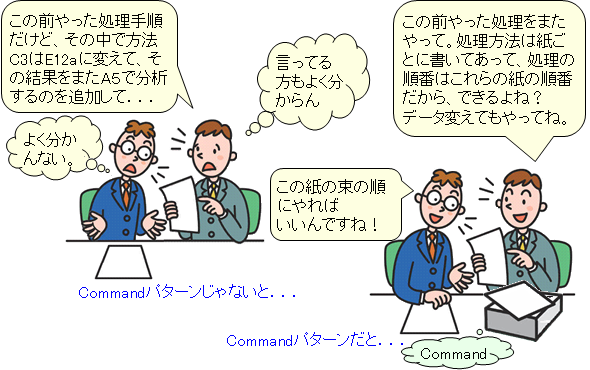
例えば、既存の処理方法を組み合わせてデータ処理をしていたとします。処理方法はよく知っていても、それらを組み合わせて行う手順が毎回違うので、その都度処理手順を書き直す必要があります。そこで、処理方法を一つにつき一枚の紙に書き、それらを処理手順通り重ねて束にした処理手順書を作りました。こうすれば、処理の順番が変わっても、処理方法の書かれた紙の順番を変えるだけで済むというわけです。
Command は Event と呼ばれることもあります。「イベント駆動プログラミング」で使われる「イベント」と同じ意味です。マウスをクリックした、キーを押した、といったイベントが起きたときに、その出来事をいったんインスタンスという「もの」にしておき、発生順に処理しておくのです。
GUIアプリケーションなどでは、GUI部品から編集対象のオブジェクトへ命令(コマンド)を送らなければならないため、GUI部品と編集対象のオブジェクトが密な関係になりやすい。しかし、編集対象のオブジェクトの汎用性を高くするためには、GUI部品とは基本的に切り離されていた方が望ましい。 このような問題を解決するには、Command パターンが向いています。
例題
計算過程を記憶する電卓クラスを作成しなさい。(とりあえず、加算と乗算のみ)
後で、最初に与えられた数値を変更しても、記憶している同じ過程で計算ができるようにしなさい。
(10 + 20) * 4
次に、10 を 30 に変えて
(30 + 20) * 4
200.0
|
Commandパターンを使用しない例 Operator.java public class Operator {
public static final int ADD = 1;
public static final int SUBTRACT = 2;
public static final int MULTIPLY = 3;
public static final int DIVIDE = 4;
protected int operation;
protected double value;
public Operator(int operation, double value) {
this.operation = operation;
this.value = value;
}
}
Calculator.java public class Calculator {
private ArrayList<Operator> operations = new ArrayList<Operator>();
private double value = 0.0;
public Calculator(double value) {
this.value = value;
}
public Calculator set(double value) {
this.value = value;
return this;
}
public Calculator add(double value) {
operationAdd(value);
operations.add(new Operator(Operator.ADD, value));
return this;
}
public Calculator multiply(double value) {
operationMultiply(value);
operations.add(new Operator(Operator.MULTIPLY, value));
return this;
}
public void operationAdd(double value) {
this.value += value;
}
public void operationMultiply(double value) {
this.value *= value;
}
public String toString() {
return String.format("%.1f", value);
}
public void clear() {
operations.clear();
}
public Calculator recalc() {
Iterator<Operator> it = operations.iterator();
while(it.hasNext()) {
Operator cmd = (Operator)it.next();
switch (cmd.operation) {
case Operator.ADD:
operationAdd(cmd.value);
break;
case Operator.MULTIPLY:
operationMultiply(cmd.value);
break;
}
}
return this;
}
}
Main.java public class Main {
public static void main(String[] args) {
Calculator cal = new Calculator(10);
System.out.println(cal.add(20).multiply(4));
System.out.println(cal.set(30).recalc());
}
}
|
Commandパターンを使用した例 AbstractCommand.java public abstract class AbstractCommand {
protected double value;
public Calculator cal;
public abstract void execute();
}
MacroCommand.java public class MacroCommand extends AbstractCommand {
private ArrayList<AbstractCommand> commands = new ArrayList<AbstractCommand>();
public MacroCommand(Calculator cal) {
this.cal = cal;
}
public void append(AbstractCommand cmd) {
if (cmd != this) {
cmd.cal = this.cal;
this.commands.add(cmd);
}
}
public void clear() {
commands.clear();
}
public void execute() {
Iterator<AbstractCommand> it = commands.iterator();
while(it.hasNext()) {
it.next().execute();
}
}
}
CommandAdd.java public class CommandAdd extends AbstractCommand {
public CommandAdd(double value) {
this.value = value;
}
public void execute() {
cal.set(cal.get() + value);
}
}
CommandMultiply.java public class CommandMultiply extends AbstractCommand {
public CommandMultiply(double value) {
this.value = value;
}
public void execute() {
cal.set(cal.get() * value);
}
}
Calculator.java public class Calculator {
private double value = 0.0;
public Calculator(double value) {
this.value = value;
}
public void set(double value) {
this.value = value;
}
public double get() {
return value;
}
public String toString() {
return String.format("%.1f", value);
}
}
Main.java public class Main {
public static void main(String[] args) {
Calculator cal = new Calculator(10);
MacroCommand com = new MacroCommand(cal);
com.append(new CommandAdd(20));
com.append(new CommandMultiply(4));
com.execute();
System.out.println(cal);
cal.set(30);
com.execute();
System.out.println(cal);
}
}
|
|
この例では、演算ごとに演算の種類とそのときの値(足したり掛けたりする値)を記憶していきます。そして、再計算の時には、記憶されていた演算の種類とそのときの値とを受け取り、計算していきます。計算はうまくできているようです。 しかし、この後減算と除算を追加しようとしたら、recalc() に新たに減算と除算のための case 文を追加しなければなりません。これでは拡張性が良いとは言えません。 |
Command パターンでは、演算の種類を int 値で表すような方法はやめて、演算そのものを1つのCommand オブジェクトに含ませ、そのオブジェクトごと引数に渡す方法を考えます。演算の種類、つまりCommand オブジェクトに共通のインターフェースを持たせることにより、MacroCommand クラスは、どんな種類の演算(Command オブジェクト)を受け取っても、共通の演算を行うメソッド(execute)を実行すれば良いことになります。 この後減算と除算を追加するのも、Command クラスを継承すればよいだけです。Calculator クラスの execute() メソッドが演算の方法を知っている必要はありません。演算は、Command クラスの各サブクラスに委譲すればよいのです。(ここでも、ポリモーフィズムが利用されています。) value に 10 という値を持った Calculator インスタンスを持つ MacroCommand インスタンスを生成します。 次に、value に 20 という値と Calculator インスタンスを持った CommandAdd インスタンスをスタックに保存します。(Calculator インスタンスはすべて同じもの) 次に、value に 4 という値と Calculator インスタンスを持った CommandMultiply インスタンスをスタックに保存します。(Calculator インスタンスはすべて同じもの) そして、MacroCommand インスタンスの execute() で計算します。 まず、最初のオブジェクトは CommandAdd インスタンスなので、CommandAdd インスタンスの execute() を呼び出します。Calculator インスタンスの value (=10)と自身の value (=20)を加算(=30)し、Calculator インスタンスの value にセットします。 そして、次のオブジェクトは CommandMultiply インスタンスなので、CommandMultiply インスタンスの execute() を呼び出します。Calculator インスタンスの value (=30)と自身の value (=4)を乗算(=120)し、Calculator インスタンスの value にセットします。 計算が終われば、Calculator インスタンスの value(=120) を表示します。 Command パターンを適用すると、各演算のソースコードを変更しなくても、いろいろな演算を追加することができます。また、既存の演算を組み合わせて、新たな演算を作ることも可能です。新しい演算の execute メソッド内に、既存の演算の execute メソッドを記述すれば、新しい演算が実行された際、記述した順に既存の演算も実行されます。これにより、再利用性も高くなります。 |
|
Commandパターンを使用しない例 Operator.h class Operator
{
public:
static const int ADD = 1;
static const int SUBTRACT = 2;
static const int MULTIPLY = 3;
static const int DIVIDE = 4;
int operation;
double value;
Operator(void);
Operator(int, double);
virtual ~Operator(void);
}; Operator.cpp #include "Operator.h"
Operator::Operator(void) {}
Operator::Operator(int ope, double val) : operation(ope), value(val) {}
Operator::~Operator(void) {}
calculator.h #include <list>
#include <string>
#include "operator.h"
class Calculator
{
private:
double value;
std::list<Operator *> operations;
public:
Calculator(void);
Calculator(double);
virtual ~Calculator(void);
Calculator* set(double);
Calculator* add(double);
Calculator* multiply(double);
void operationAdd(double);
void operationMultiply(double);
std::string toString(void);
void clear(void);
Calculator* recalc(void);
}; calculator.cpp #include <sstream>
#include "calculator.h"
using namespace std;
Calculator::Calculator(void) : value(0.0) {}
Calculator::Calculator(double val) : value(val) {}
Calculator::~Calculator(void) {
list<Operator *>::iterator it = operations.begin();
while(it != operations.end())
delete *it++;
}
Calculator* Calculator::set(double val) {
value = val;
return this;
}
Calculator* Calculator::add(double val) {
operationAdd(val);
operations.push_back(new Operator(Operator::ADD, val));
return this;
}
Calculator* Calculator::multiply(double val) {
operationMultiply(val);
operations.push_back(new Operator(Operator::MULTIPLY, val));
return this;
}
void Calculator::operationAdd(double val) {
this->value += val;
}
void Calculator::operationMultiply(double val) {
this->value *= val;
}
string Calculator::toString(void) {
char buff[20];
sprintf(buff, "%.1f", value);
return buff;
}
void Calculator::clear(void) {
operations.clear();
}
Calculator* Calculator::recalc(void) {
list<Operator*>::iterator it = operations.begin();
while(it != operations.end()) {
Operator* cmd = *it++;
switch(cmd->operation) {
case Operator::ADD:
operationAdd(cmd->value);
break;
case Operator::MULTIPLY:
operationMultiply(cmd->value);
break;
}
}
return this;
}
main.cpp #include <iostream>
using namespace std;
#include "calculator.h"
int main() {
Calculator* cal = new Calculator(10);
cout << cal->add(20)->multiply(4)->toString() << endl;
cout << cal->set(30)->recalc()->toString() << endl;
delete cal;
return 0;
}
|
Commandパターンを使用した例 abstractCommand.h #include "calculator.h"
class AbstractCommand
{
public:
double value;
Calculator* cal;
AbstractCommand(void);
AbstractCommand(double);
virtual ~AbstractCommand(void);
virtual void execute(void) = 0;
}; abstractCommand.cpp #include "abstractCommand.h"
AbstractCommand::AbstractCommand(void) {}
AbstractCommand::AbstractCommand(double val) : value(val) {}
AbstractCommand::~AbstractCommand(void) {}
macroCommand.h #include <list>
#include "abstractCommand.h"
class MacroCommand : public AbstractCommand
{
private:
double value;
std::list<AbstractCommand*> commands;
public:
MacroCommand(void);
MacroCommand(Calculator*);
virtual ~MacroCommand(void);
void execute();
void append(AbstractCommand*);
void clear();
}; macroCommand.cpp #include "macroCommand.h"
using namespace std;
MacroCommand::MacroCommand(void) {}
MacroCommand::MacroCommand(Calculator* c) {
cal = c;
}
MacroCommand::~MacroCommand(void) {}
void MacroCommand::execute() {
list<AbstractCommand*>::iterator it = commands.begin();
while(it != commands.end()) {
AbstractCommand* cmd = *it++;
cmd->execute();
}
}
void MacroCommand::append(AbstractCommand* cmd) {
if (cmd != this) {
cmd->cal = this->cal;
commands.push_back(cmd);
}
}
void MacroCommand::clear() { commands.clear(); } commandAdd.h #include "abstractCommand.h"
class CommandAdd : public AbstractCommand
{
public:
CommandAdd(void);
CommandAdd(double);
virtual ~CommandAdd(void);
void execute(void);
}; commandAdd.cpp #include "commandAdd.h"
CommandAdd::CommandAdd(void) {}
CommandAdd::CommandAdd(double val) : AbstractCommand(val) {}
CommandAdd::~CommandAdd(void) {}
void CommandAdd::execute(void) {
cal->set(cal->get() + value);
} commandMultiply.h #include "abstractCommand.h"
class CommandMultiply : public AbstractCommand
{
public:
CommandMultiply(void);
CommandMultiply(double);
virtual ~CommandMultiply(void);
void execute(void);
}; commandMultiply.cpp #include "commandMultiply.h"
CommandMultiply::CommandMultiply(void) {}
CommandMultiply::CommandMultiply(double val) : AbstractCommand(val) {}
CommandMultiply::~CommandMultiply(void) {}
void CommandMultiply::execute(void) {
cal->set(cal->get() * value);
}
calculator.h #include <string>
class Calculator
{
private:
double value;
public:
Calculator(void);
Calculator(double);
virtual ~Calculator(void);
void set(double);
double get(void);
std::string toString(void);
}; calculator.cpp #include <sstream>
#include "calculator.h"
using namespace std;
Calculator::Calculator(void) : value(0.0) {}
Calculator::Calculator(double val) : value(val) {}
Calculator::~Calculator(void) {
void Calculator::set(double val) { value = val; }
double Calculator::get() { return value; }
string Calculator::toString() {
char buff[20];
sprintf(buff, "%.1f", value);
return buff;
}
main.cpp #include <iostream>
using namespace std;
#include "calculator.h"
#include "macroCommand.h"
#include "commandMultiply.h"
#include "commandAdd.h"
int main() {
Calculator cal(10);
MacroCommand com(&cal);
CommandAdd add(20);
CommandMultiply mul(4);
com.append(&add);
com.append(&mul);
com.execute();
cout << cal.toString() << endl;
cal.set(30);
com.execute();
cout << cal.toString() << endl;
return 0;
}
|
|
この例では、演算ごとに演算の種類とそのときの値(足したり掛けたりする値)を記憶していきます。そして、再計算の時には、記憶されていた演算の種類とそのときの値とを受け取り、計算していきます。計算はうまくできているようです。 しかし、この後減算と除算を追加しようとしたら、recalc() に新たに減算と除算のための case 文を追加しなければなりません。これでは拡張性が良いとは言えません。 |
Command パターンでは、演算の種類を int 値で表すような方法はやめて、演算そのものを1つのCommand オブジェクトに含ませ、そのオブジェクトごと引数に渡す方法を考えます。演算の種類、つまりCommand オブジェクトに共通のインターフェースを持たせることにより、MacroCommand クラスは、どんな種類の演算(Command オブジェクト)を受け取っても、共通の演算を行うメソッド(execute)を実行すれば良いことになります。 この後減算と除算を追加するのも、Command クラスを継承すればよいだけです。Calculator クラスの execute() メソッドが演算の方法を知っている必要はありません。演算は、Command クラスの各サブクラスに委譲すればよいのです。(ここでも、ポリモーフィズムが利用されています。) value に 10 という値を持った Calculator インスタンスを持つ MacroCommand インスタンスを生成します。 次に、value に 20 という値と Calculator インスタンスを持った CommandAdd インスタンスをスタックに保存します。(Calculator インスタンスはすべて同じもの) 次に、value に 4 という値と Calculator インスタンスを持った CommandMultiply インスタンスをスタックに保存します。(Calculator インスタンスはすべて同じもの) そして、MacroCommand インスタンスの execute() で計算します。 まず、最初のオブジェクトは CommandAdd インスタンスなので、CommandAdd インスタンスの execute() を呼び出します。Calculator インスタンスの value (=10)と自身の value (=20)を加算(=30)し、Calculator インスタンスの value にセットします。 そして、次のオブジェクトは CommandMultiply インスタンスなので、CommandMultiply インスタンスの execute() を呼び出します。Calculator インスタンスの value (=30)と自身の value (=4)を乗算(=120)し、Calculator インスタンスの value にセットします。 計算が終われば、Calculator インスタンスの value(=120) を表示します。 Command パターンを適用すると、各演算のソースコードを変更しなくても、いろいろな演算を追加することができます。また、既存の演算を組み合わせて、新たな演算を作ることも可能です。新しい演算の execute メソッド内に、既存の演算の execute メソッドを記述すれば、新しい演算が実行された際、記述した順に既存の演算も実行されます。これにより、再利用性も高くなります。 |
|
Commandパターンを使用しない例 Operator.cs class Operator
{
public const int ADD = 1;
public const int SUBTRACT = 2;
public const int MULTIPLY = 3;
public const int DIVIDE = 4;
public int operation;
public double value;
public Operator(int operation, double value)
{
this.operation = operation;
this.value = value;
}
} Calculator.cs class Calculator
{
private double value = 0;
private ArrayList operations = new ArrayList();
public Calculator(double value)
{
this.value = value;
}
public Calculator SetValue(double value)
{
this.value = value;
return this;
}
public Calculator Add(double value)
{
OperationAdd(value);
operations.Add(new Operator(Operator.ADD, value));
return this;
}
public Calculator Multiply(double value)
{
OperationMultiply(value);
operations.Add(new Operator(Operator.MULTIPLY, value));
return this;
}
public void OperationAdd(double value)
{
this.value += value;
}
public void OperationMultiply(double value)
{
this.value *= value;
}
public override string ToString()
{
return value.ToString("F1");
}
public Calculator Recalc()
{
foreach(Operator cmd in operations)
{
switch(cmd.operation)
{
case Operator.ADD:
OperationAdd(cmd.value);
break;
case Operator.MULTIPLY:
OperationMultiply(cmd.value);
break;
}
}
return this;
}
} Program.cs class Program
{
static void Main(string[] args)
{
Calculator cal = new Calculator(10);
Console.WriteLine(cal.Add(20).Multiply(4));
Console.WriteLine(cal.SetValue(30).Recalc());
}
}
|
Commandパターンを使用した例 AbstractCommand.cs abstract class AbstractCommand
{
public double value = 0;
public Calculator cal;
public abstract void Execute();
}
MacroCommand.cs class MacroCommand : AbstractCommand
{
private ArrayList commands = new ArrayList();
public MacroCommand(Calculator cal)
{
this.cal = cal);
}
public override void Execute()
{
foreach(AbstractCommand c in commands)
{
c.Execute();
}
}
public void Append(AbstractCommand cmd)
{
if (!cmd.Equals(this))
{
cmd.cal = cal;
commands.Add(cmd);
}
}
}
Calculator.cs class Calculator
{
private double value = 0;
public Calculator(double value)
{
this.value = value;
}
public Calculator SetValue(double value)
{
this.value = value;
return this;
}
public double GetValue()
{
return value;
}
public override string ToString()
{
return value.ToString("F1");
}
}
CommandAdd.cs class CommandAdd : AbstractCommand
{
public CommandAdd(double value)
{
this.value = value;
}
public override void Execute()
{
cal.SetValue(cal.GetValue() + value);
}
}
CommandMultiply.cs class CommandMultiply : AbstractCommand
{
public CommandMultiply(double value)
{
this.value = value;
}
public override void Execute()
{
cal.SetValue(cal.GetValue() * value);
}
}
Program.cs class Program
{
static void Main(string[] args)
{
Calculator cal = new Calculator(10);
MacroCommand com = new MacroCommand(cal);
com.Append(new CommandAdd(20));
com.Append(new CommandMultiply(4));
com.Execute();
Console.WriteLine(cal);
cal.SetValue(30);
com.Execute();
Console.WriteLine(cal);
}
}
|
|
この例では、演算ごとに演算の種類とそのときの値(足したり掛けたりする値)を記憶していきます。そして、再計算の時には、記憶されていた演算の種類とそのときの値とを受け取り、計算していきます。計算はうまくできているようです。 しかし、この後減算と除算を追加しようとしたら、Recalc() に新たに減算と除算のための case 文を追加しなければなりません。これでは拡張性が良いとは言えません。 |
Command パターンでは、演算の種類を int 値で表すような方法はやめて、演算そのものを1つのCommand オブジェクトに含ませ、そのオブジェクトごと引数に渡す方法を考えます。演算の種類、つまりCommand オブジェクトに共通のインターフェースを持たせることにより、MacroCommand クラスは、どんな種類の演算(Command オブジェクト)を受け取っても、共通の演算を行うメソッド(Execute)を実行すれば良いことになります。 この後減算と除算を追加するのも、Command クラスを継承すればよいだけです。Calculator クラスの Execute() メソッドが演算の方法を知っている必要はありません。演算は、Command クラスの各サブクラスに委譲すればよいのです。(ここでも、ポリモーフィズムが利用されています。) value に 10 という値を持った Calculator インスタンスを持つ MacroCommand インスタンスを生成します。 次に、value に 20 という値と Calculator インスタンスを持った CommandAdd インスタンスをスタックに保存します。(Calculator インスタンスはすべて同じもの) 次に、value に 4 という値と Calculator インスタンスを持った CommandMultiply インスタンスをスタックに保存します。(Calculator インスタンスはすべて同じもの) そして、MacroCommand インスタンスの Execute() で計算します。 まず、最初のオブジェクトは CommandAdd インスタンスなので、CommandAdd インスタンスの Execute() を呼び出します。Calculator インスタンスの value (=10)と自身の value (=20)を加算(=30)し、Calculator インスタンスの value にセットします。 そして、次のオブジェクトは CommandMultiply インスタンスなので、CommandMultiply インスタンスの execute() を呼び出します。Calculator インスタンスの value (=30)と自身の value (=4)を乗算(=120)し、Calculator インスタンスの value にセットします。 計算が終われば、Calculator インスタンスの value(=120) を表示します。 Command パターンを適用すると、各演算のソースコードを変更しなくても、いろいろな演算を追加することができます。また、既存の演算を組み合わせて、新たな演算を作ることも可能です。新しい演算の Execute メソッド内に、既存の演算の Execute メソッドを記述すれば、新しい演算が実行された際、記述した順に既存の演算も実行されます。これにより、再利用性も高くなります。 |
|
Commandパターンを使用しない例 Operator.vb Public Class [Operator]
Public Shared ADD As Integer = 1
Public Shared SUBTRACT As Integer = 2
Public Shared MULTIPLY As Integer = 3
Public Shared DIVIDE As Integer = 4
Friend operation As Integer
Friend value As Double
Public Sub New(ByVal operation As Integer, ByVal value As Double)
Me.operation = operation
Me.value = value
End Sub
End Class
Calculator.vb Public Class Calculator
Private value As Double = 0
Private operations As ArrayList = New ArrayList()
Public Sub New(ByVal value As Double)
Me.value = value
End Sub
Public Function SetValue(ByVal value As Double) As Calculator
Me.value = value
Return Me
End Function
Public Function Add(ByVal value As Double) As Calculator
OperationAdd(value)
operations.Add(New [Operator]([Operator].ADD, value))
Return Me
End Function
Public Function Multiply(ByVal value As Double) As Calculator
OperationMultiply(value)
operations.Add(New [Operator]([Operator].MULTIPLY, value))
Return Me
End Function
Public Sub OperationAdd(ByVal value As Double)
Me.value += value
End Sub
Public Sub OperationMultiply(ByVal value As Double)
Me.value *= value
End Sub
Public Overrides Function ToString() As String
Return value.ToString("F1")
End Function
Public Sub clear()
operations.Clear()
End Sub
Public Function Recalc() As Calculator
For Each cmd As [Operator] In operations
Select Case cmd.operation
Case [Operator].ADD
OperationAdd(cmd.value)
Case [Operator].MULTIPLY
OperationMultiply(cmd.value)
End Select
Next
Return Me
End Function
End Class
Program.vb Module Main
Sub Main()
Dim cal As Calculator = New Calculator(10)
Console.WriteLine(cal.add(20).multiply(4))
Console.WriteLine(cal.setValue(30).recalc())
End Sub
End Module
|
Commandパターンを使用した例 Command.vb Public MustInherit Class Command
Friend value As Double
Friend cal As Calculator
Public MustOverride Sub Execute()
End Class
MacroCommand.vb Public Class MacroCommand
Inherits Command
Private commands As ArrayList = New ArrayList()
Public Sub New(ByVal cal As Calculator)
Me.cal = cal
End Sub
Public Overrides Sub Execute()
For Each c As Command In commands
c.Execute()
Next
End Sub
Public Sub Append(ByVal cmd As Command)
If Not cmd.Equals(Me) Then
cmd.cal = cal
commands.Add(cmd)
End If
End Sub
Public Sub Clear()
commands.Clear()
End Sub
End Class
Calculator.vb Public Class Calculator
Private value As Double = 0
Public Sub New(ByVal value As Double)
Me.value = value
End Sub
Public Function SetValue(ByVal value As Double) As Calculator
Me.value = value
Return Me
End Function
Public Function GetValue()
Return value
End Function
Public Overrides Function ToString() As String
Return value.ToString("F1")
End Function
End Class
CommandAdd.vb Public Class CommandAdd
Inherits Command
Public Sub New(ByVal value As Double)
Me.value = value
End Sub
Public Overrides Sub Execute()
cal.SetValue(cal.GetValue() + value)
End Sub
End Class
CommandMultiply.vb Public Class CommandMultiply
Inherits Command
Public Sub New(ByVal value As Double)
Me.value = value
End Sub
Public Overrides Sub Execute()
cal.SetValue(cal.GetValue() * value)
End Sub
End Class
Program.vb Module Main
Sub Main()
Dim cal As Calculator = New Calculator(10)
Dim com As MacroCommand = New MacroCommand(cal)
com.append(New CommandAdd(20))
com.append(New CommandMultiply(4))
com.execute()
Console.WriteLine(cal)
cal.setValue(30)
com.execute()
Console.WriteLine(cal)
End Sub
End Module
|
|
この例では、演算ごとに演算の種類とそのときの値(足したり掛けたりする値)を記憶していきます。そして、再計算の時には、記憶されていた演算の種類とそのときの値とを受け取り、計算していきます。計算はうまくできているようです。 しかし、この後減算と除算を追加しようとしたら、Recalc() に新たに減算と除算のための case 文を追加しなければなりません。これでは拡張性が良いとは言えません。 |
Command パターンでは、演算の種類を int 値で表すような方法はやめて、演算そのものを1つのCommand オブジェクトに含ませ、そのオブジェクトごと引数に渡す方法を考えます。演算の種類、つまりCommand オブジェクトに共通のインターフェースを持たせることにより、MacroCommand クラスは、どんな種類の演算(Command オブジェクト)を受け取っても、共通の演算を行うメソッド(Execute)を実行すれば良いことになります。 この後減算と除算を追加するのも、Command クラスを継承すればよいだけです。Calculator クラスの Execute() メソッドが演算の方法を知っている必要はありません。演算は、Command クラスの各サブクラスに委譲すればよいのです。(ここでも、ポリモーフィズムが利用されています。) value に 10 という値を持った Calculator インスタンスを持つ MacroCommand インスタンスを生成します。 次に、value に 20 という値と Calculator インスタンスを持った CommandAdd インスタンスをスタックに保存します。(Calculator インスタンスはすべて同じもの) 次に、value に 4 という値と Calculator インスタンスを持った CommandMultiply インスタンスをスタックに保存します。(Calculator インスタンスはすべて同じもの) そして、MacroCommand インスタンスの Execute() で計算します。 まず、最初のオブジェクトは CommandAdd インスタンスなので、CommandAdd インスタンスの Execute() を呼び出します。Calculator インスタンスの value (=10)と自身の value (=20)を加算(=30)し、Calculator インスタンスの value にセットします。 そして、次のオブジェクトは CommandMultiply インスタンスなので、CommandMultiply インスタンスの execute() を呼び出します。Calculator インスタンスの value (=30)と自身の value (=4)を乗算(=120)し、Calculator インスタンスの value にセットします。 計算が終われば、Calculator インスタンスの value(=120) を表示します。 Command パターンを適用すると、各演算のソースコードを変更しなくても、いろいろな演算を追加することができます。また、既存の演算を組み合わせて、新たな演算を作ることも可能です。新しい演算の Execute メソッド内に、既存の演算の Execute メソッドを記述すれば、新しい演算が実行された際、記述した順に既存の演算も実行されます。これにより、再利用性も高くなります。 |
|
Commandパターンを使用しない例 Operator.js module.exports = class Operator {
static ADD = 1;
static SUBTRACT = 2;
static MULTIPLY = 3;
static DIVIDE = 4;
constructor(operation, value) {
this.operation = operation;
this.value = value;
}
}
Calculator.js const Operator = require("./Operator.js");
module.exports = class Calculator {
constructor(value) {
this.value = value;
this.operations = new Array();
}
set(value) {
this.value = value;
return this;
}
add(value) {
this.operationAdd(value);
this.operations.push(new Operator(Operator.ADD, value));
return this;
}
multiply(value) {
this.operationMultiply(value);
this.operations.push(new Operator(Operator.MULTIPLY, value));
return this;
}
operationAdd(value) {
this.value += value;
}
operationMultiply(value) {
this.value *= value;
}
toString() {
return this.value.toFixed(1);
}
clear() {
this.operations.clear();
}
recalc() {
this.operations.forEach(this.calculate, this);
return this;
}
calculate(cmd, index, list) {
switch (cmd.operation) {
case Operator.ADD:
this.operationAdd(cmd.value);
break;
case Operator.MULTIPLY:
this.operationMultiply(cmd.value);
break;
}
}
}
Main.js const Calculator = require("./Calculator.js");
let cal = new Calculator(10);
process.stdout.write(cal.add(20).multiply(4) + "\n");
process.stdout.write(cal.set(30).recalc() + "\n");
|
Commandパターンを使用した例 AbstractCommand.js module.exports = class AbstractCommand {
execute() {}
}
MacroCommand.js const AbstractCommand = require("./AbstractCommand.js");
module.exports = class MacroCommand extends AbstractCommand {
constructor(cal) {
super();
this.cal = cal;
this.commands = new Array();
}
append(cmd) {
if (cmd != this) {
cmd.cal = this.cal;
this.commands.push(cmd);
}
}
clear() {
this.commands.clear();
}
execute() {
this.commands.forEach(function(cmd) { cmd.execute(); }, this);
}
}
CommandAdd.js const AbstractCommand = require("./AbstractCommand.js");
module.exports = class CommandAdd extends AbstractCommand {
constructor(value) {
super();
this.value = value;
}
execute() {
this.cal.set(this.cal.get() + this.value);
}
}
CommandMultiply.js const AbstractCommand = require("./AbstractCommand.js");
module.exports = class CommandMultiply extends AbstractCommand {
constructor(value) {
super();
this.value = value;
}
execute() {
this.cal.set(this.cal.get() * this.value);
}
}
Calculator.js module.exports = class Calculator {
constructor(value) {
this.value = value;
}
set(value) {
this.value = value;
}
get() {
return this.value;
}
toString() {
return this.value.toFixed(1);
}
}
Main.js const Calculator = require("./Calculator.js");
const MacroCommand = require("./MacroCommand.js");
const CommandAdd = require("./CommandAdd.js");
const CommandMultiply = require("./CommandMultiply.js");
let cal = new Calculator(10);
let com = new MacroCommand(cal);
com.append(new CommandAdd(20));
com.append(new CommandMultiply(4));
com.execute();
process.stdout.write(cal + "\n");
cal.set(30);
com.execute();
process.stdout.write(cal + "\n");
|
|
この例では、演算ごとに演算の種類とそのときの値(足したり掛けたりする値)を記憶していきます。そして、再計算の時には、記憶されていた演算の種類とそのときの値とを受け取り、計算していきます。計算はうまくできているようです。 しかし、この後減算と除算を追加しようとしたら、recalc() に新たに減算と除算のための case 文を追加しなければなりません。これでは拡張性が良いとは言えません。 |
Command パターンでは、演算の種類を int 値で表すような方法はやめて、演算そのものを1つのCommand オブジェクトに含ませ、そのオブジェクトごと引数に渡す方法を考えます。演算の種類、つまりCommand オブジェクトに共通のインターフェースを持たせることにより、MacroCommand クラスは、どんな種類の演算(Command オブジェクト)を受け取っても、共通の演算を行うメソッド(execute)を実行すれば良いことになります。 この後減算と除算を追加するのも、Command クラスを継承すればよいだけです。Calculator クラスの execute() メソッドが演算の方法を知っている必要はありません。演算は、Command クラスの各サブクラスに委譲すればよいのです。(ここでも、ポリモーフィズムが利用されています。) value に 10 という値を持った Calculator インスタンスを持つ MacroCommand インスタンスを生成します。 次に、value に 20 という値と Calculator インスタンスを持った CommandAdd インスタンスをスタックに保存します。(Calculator インスタンスはすべて同じもの) 次に、value に 4 という値と Calculator インスタンスを持った CommandMultiply インスタンスをスタックに保存します。(Calculator インスタンスはすべて同じもの) そして、MacroCommand インスタンスの execute() で計算します。 まず、最初のオブジェクトは CommandAdd インスタンスなので、CommandAdd インスタンスの execute() を呼び出します。Calculator インスタンスの value (=10)と自身の value (=20)を加算(=30)し、Calculator インスタンスの value にセットします。 そして、次のオブジェクトは CommandMultiply インスタンスなので、CommandMultiply インスタンスの execute() を呼び出します。Calculator インスタンスの value (=30)と自身の value (=4)を乗算(=120)し、Calculator インスタンスの value にセットします。 計算が終われば、Calculator インスタンスの value(=120) を表示します。 Command パターンを適用すると、各演算のソースコードを変更しなくても、いろいろな演算を追加することができます。また、既存の演算を組み合わせて、新たな演算を作ることも可能です。新しい演算の execute メソッド内に、既存の演算の execute メソッドを記述すれば、新しい演算が実行された際、記述した順に既存の演算も実行されます。これにより、再利用性も高くなります。 |
|
Commandパターンを使用しない例 Operator.pm package Operator {
sub new {
my ($class, $operation, $value) = @_;
my $this = { operation => $operation, value => $value; };
return bless $this, $class;
}
}
1;
Calculator.pm package Calculator {
use Operator;
sub new {
my ($class, $value) = @_;
my $this = { value => $value, operations => () };
return bless $this, $class;
}
sub set {
my ($this, $value) = @_;
$this->{value} = $value;
return $this;
}
sub add {
my ($this, $value) = @_;
$this->operationAdd($value);
push(@{$this->{operations}}, new Operator(ADD, $value));
return $this;
}
sub multiply {
my ($this, $value) = @_;
$this->operationMultiply($value);
push(@{$this->{operations}},
new Operator(MULTIPLY, $value));
return $this;
}
sub operationAdd {
my ($this, $value) = @_;
$this->{value} += $value;
}
sub operationMultiply {
my ($this, $value) = @_;
$this->{value} *= $value;
}
sub toString {
my ($this) = @_;
return sprintf("%.1f", $this->{value});
}
sub clear {
my ($this) = @_;
$this->{operations}->clear();
}
sub recalc {
my ($this) = @_;
foreach my $cmd (@{$this->{operation}}) {
if ($cmd->{operation} eq ADD) {
}
elsif ($cmd->{operation} eq MULTIPLY) {
$this->operationMultiply($cmd->{value});
}
}
return $this;
}
}
1;
Main.pl use lib qw(./);
use Calculator;
my $cal = new Calculator(10);
print $cal->add(20)->multiply(4)->toString() . "\n";
print $cal->set(30)->recalc()->toString() . "\n";
|
Commandパターンを使用した例 AbstractCommand.pm package AbstractCommand {
sub execute {}
}
1;
MacroCommand.pm package MacroCommand {
use base qw(AbstractCommand);
sub new {
my ($class, $cal) = @_;
my $this = { cal => $cal, commands => () };
return bless $this, $class;
}
sub append {
my ($class, $cmd) = @_;
if ($cmd ne $this) {
$cmd->cal = $cmd->{cal};
push(@{$this->{commands}}, $cmd);
}
}
sub clear {
my ($this) = @_;
$this->{commands}->clear();
}
sub execute {
my ($this) = @_;
foreach my $cmd (@{$this->{commands}}) {
$cmd->execute();
}
}
}
1;
CommandAdd.pm package CommandAdd {
use base qw(AbstractCommand);
sub new {
my ($class, $value) = @_;
my $this = { value => $value };
return bless $this, $class;
}
sub execute {
my ($this) = @_;
$this->{cal}->set($this->{cal}->get() + $this->{value});
}
}
1;
CommandMultiply.pm package CommandMultiply {
use base qw(AbstractCommand);
sub new {
my ($class, $value) = @_;
my $this = { value => $value };
return bless $this, $class;
}
sub execute {
my ($this) = @_;
$this->{cal}->set($this->{cal}->get() * $this->{value});
}
}
1;
Calculator.pm package Calculator {
sub new {
my ($class, $value) = @_;
my $this = { value => $value };
return bless $this, $class;
}
sub set {
my ($this, $value) = @_;
$this->{value} = $value;
}
sub get {
my ($this) = @_;
return $this->{value};
}
sub toString {
my ($this) = @_;
return sprintf("%.1f", $this->{value});
}
}
1;
Main.pl use lib qw(./);
use Calculator;
use MacroCommand;
use CommandAdd;
use CommandMultiply;
my $cal = new Calculator(10);
my $com = new MacroCommand(cal);
$com->append(new CommandAdd(20));
$com->append(new CommandMultiply(4));
$com->execute();
print cal->toString() . "\n";
$cal->set(30);
$com->execute();
print cal->toString() . "\n";
|
|
この例では、演算ごとに演算の種類とそのときの値(足したり掛けたりする値)を記憶していきます。そして、再計算の時には、記憶されていた演算の種類とそのときの値とを受け取り、計算していきます。計算はうまくできているようです。 しかし、この後減算と除算を追加しようとしたら、recalc() に新たに減算と除算のための if 文を追加しなければなりません。これでは拡張性が良いとは言えません。 |
Command パターンでは、演算の種類を int 値で表すような方法はやめて、演算そのものを1つのCommand オブジェクトに含ませ、そのオブジェクトごと引数に渡す方法を考えます。演算の種類、つまりCommand オブジェクトに共通のインターフェースを持たせることにより、MacroCommand クラスは、どんな種類の演算(Command オブジェクト)を受け取っても、共通の演算を行うメソッド(execute)を実行すれば良いことになります。 この後減算と除算を追加するのも、Command クラスを継承すればよいだけです。Calculator クラスの execute() メソッドが演算の方法を知っている必要はありません。演算は、Command クラスの各サブクラスに委譲すればよいのです。(ここでも、ポリモーフィズムが利用されています。) value に 10 という値を持った Calculator インスタンスを持つ MacroCommand インスタンスを生成します。 次に、value に 20 という値と Calculator インスタンスを持った CommandAdd インスタンスをスタックに保存します。(Calculator インスタンスはすべて同じもの) 次に、value に 4 という値と Calculator インスタンスを持った CommandMultiply インスタンスをスタックに保存します。(Calculator インスタンスはすべて同じもの) そして、MacroCommand インスタンスの execute() で計算します。 まず、最初のオブジェクトは CommandAdd インスタンスなので、CommandAdd インスタンスの execute() を呼び出します。Calculator インスタンスの value (=10)と自身の value (=20)を加算(=30)し、Calculator インスタンスの value にセットします。 そして、次のオブジェクトは CommandMultiply インスタンスなので、CommandMultiply インスタンスの execute() を呼び出します。Calculator インスタンスの value (=30)と自身の value (=4)を乗算(=120)し、Calculator インスタンスの value にセットします。 計算が終われば、Calculator インスタンスの value(=120) を表示します。 Command パターンを適用すると、各演算のソースコードを変更しなくても、いろいろな演算を追加することができます。また、既存の演算を組み合わせて、新たな演算を作ることも可能です。新しい演算の execute メソッド内に、既存の演算の execute メソッドを記述すれば、新しい演算が実行された際、記述した順に既存の演算も実行されます。これにより、再利用性も高くなります。 |
|
Commandパターンを使用しない例 Operator.rb class Operator
ADD = 1
SUBTRACT = 2
MULTIPLY = 3
DIVIDE = 4
attr_reader :operation
attr_reader :value
def initialize(operation, value) {
@operation = operation
@value = value
end
end
Calculator.rb require './Operator'
class Calculator
def initialize(value)
@value = value
@operations = Array.new()
end
def set(value)
@value = value
return self
end
def add(value)
operationAdd(value)
@operations.push(Operator.new(Operator::ADD, value))
return self
end
def multiply(value)
operationMultiply(value)
@operations.push(
Operator.new(Operator::MULTIPLY, value))
return self
end
def operationAdd(value)
@value += value
end
def operationMultiply(value)
@value *= value
end
def to_s()
return sprintf("%.1f", @value)
end
def clear()
@operations.clear()
end
def recalc()
@operations.each do |cmd|
case cmd.operation
when Operator::ADD then
operationAdd(cmd.value)
when Operator::MULTIPLY then
operationMultiply(cmd.value)
end
end
return self
end
end
Main.rb require './Calculator'
cal = Calculator.new(10)
puts cal.add(20).multiply(4).to_s()
puts cal.set(30).recalc().to_s()
|
Commandパターンを使用した例 AbstractCommand.rb class AbstractCommand
def execute()
puts "execute メソッドを定義してください。"
end
end
MacroCommand.rb require './AbstractCommand'
class MacroCommand < AbstractCommand
def initialize(cal) {
super()
@cal = cal
@commands = Array.new()
end
def append(cmd)
if cmd != self then
cmd.cal = @cal
@commands.push(cmd)
end
end
def clear()
@commands.clear()
end
def execute()
@commands.each do |cmd|
cmd.execute()
end
end
CommandAdd.rb require './AbstractCommand'
class CommandAdd < AbstractCommand
attr_accessor :cal
def initialize(value)
super()
@value = value
end
def execute()
@cal.set(@cal.get() + @value)
end
end
CommandMultiply.rb require './AbstractCommand'
class CommandMultiply < AbstractCommand
attr_accessor :cal
def initialize(value)
super()
@value = value
end
def execute()
@cal.set(@cal.get() * @value)
end
end
Calculator.rb class Calculator
def initialize(value)
@value = value
end
def set(value)
@value = value
end
def get()
return @value
end
def to_s()
return sprintf("%.1f", @value)
end
end
Main.rb require './Calculator'
require './MacroCommand'
require './CommandAdd'
require './CommandMultiply'
cal = Calculator.new(10)
com = MacroCommand.new(cal)
com.append(CommandAdd.new(20))
com.append(CommandMultiply.new(4))
com.execute()
puts cal.to_s()
cal.set(30)
com.execute()
puts cal.to_s()
|
|
この例では、演算ごとに演算の種類とそのときの値(足したり掛けたりする値)を記憶していきます。そして、再計算の時には、記憶されていた演算の種類とそのときの値とを受け取り、計算していきます。計算はうまくできているようです。 しかし、この後減算と除算を追加しようとしたら、recalc() に新たに減算と除算のための when 文を追加しなければなりません。これでは拡張性が良いとは言えません。 |
Command パターンでは、演算の種類を int 値で表すような方法はやめて、演算そのものを1つのCommand オブジェクトに含ませ、そのオブジェクトごと引数に渡す方法を考えます。演算の種類、つまりCommand オブジェクトに共通のインターフェースを持たせることにより、MacroCommand クラスは、どんな種類の演算(Command オブジェクト)を受け取っても、共通の演算を行うメソッド(execute)を実行すれば良いことになります。 この後減算と除算を追加するのも、Command クラスを継承すればよいだけです。Calculator クラスの execute() メソッドが演算の方法を知っている必要はありません。演算は、Command クラスの各サブクラスに委譲すればよいのです。(ここでも、ポリモーフィズムが利用されています。) value に 10 という値を持った Calculator インスタンスを持つ MacroCommand インスタンスを生成します。 次に、value に 20 という値と Calculator インスタンスを持った CommandAdd インスタンスをスタックに保存します。(Calculator インスタンスはすべて同じもの) 次に、value に 4 という値と Calculator インスタンスを持った CommandMultiply インスタンスをスタックに保存します。(Calculator インスタンスはすべて同じもの) そして、MacroCommand インスタンスの execute() で計算します。 まず、最初のオブジェクトは CommandAdd インスタンスなので、CommandAdd インスタンスの execute() を呼び出します。Calculator インスタンスの value (=10)と自身の value (=20)を加算(=30)し、Calculator インスタンスの value にセットします。 そして、次のオブジェクトは CommandMultiply インスタンスなので、CommandMultiply インスタンスの execute() を呼び出します。Calculator インスタンスの value (=30)と自身の value (=4)を乗算(=120)し、Calculator インスタンスの value にセットします。 計算が終われば、Calculator インスタンスの value(=120) を表示します。 Command パターンを適用すると、各演算のソースコードを変更しなくても、いろいろな演算を追加することができます。また、既存の演算を組み合わせて、新たな演算を作ることも可能です。新しい演算の execute メソッド内に、既存の演算の execute メソッドを記述すれば、新しい演算が実行された際、記述した順に既存の演算も実行されます。これにより、再利用性も高くなります。 |
|
Commandパターンを使用しない例 Operator.py class Operator:
ADD = 1
SUBTRACT = 2
MULTIPLY = 3
DIVIDE = 4
def __init__(self, operation, value):
self.operation = operation
self.value = value
Calculator.py from Operator import Operator
class Calculator:
def __init__(self, value):
self.value = value
self.operations = []
def set(self, value):
self.value = value
return self
def add(self, value):
self.operationAdd(value)
self.operations.append(Operator(Operator.ADD, value))
return self
def multiply(self, value):
self.operationMultiply(value)
self.operations.append(new Operator(Operator.MULTIPLY, value))
return self
def operationAdd(self, value):
self.value += value
def operationMultiply(self, value):
self.value *= value
def toString(self):
return '{:.1f}'.format(self.value)
def clear(self):
self.operations.clear()
def recalc(self):
for cmd in self.operations:
if cmd.operation == Operator.ADD:
self.operationAdd(cmd.value)
elif cmd.operation == Operator.MULTIPLY:
self.operationMultiply(cmd.value)
return self
Main.py from Calculator import Calculator
cal = Calculator(10)
print(cal.add(20).multiply(4).toString())
print(cal.set(30).recalc().toString())
|
Commandパターンを使用した例 AbstractCommand.py from abc import ABCMeta, abstractmethod
class AbstractCommand(metaclass=ABCMeta):
@abstractmethod
def execute(self):
pass
MacroCommand.py from AbstractCommand import AbstractCommand
class MacroCommand(AbstractCommand):
def __init__(self, cal):
self.cal = cal
self.commands = []
def append(self, cmd):
if cmd != self:
cmd.cal = self.cal
self.commands.append(cmd)
def clear(self):
self.commands.clear()
def execute(self):
for cmd in self.commands:
cmd.execute()
CommandAdd.py from AbstractCommand import AbstractCommand
class CommandAdd(AbstractCommand):
def __init__(self, value):
self.value = value
def execute(self):
self.cal.set(self.cal.get() + self.value)
CommandMultiply.py from AbstractCommand import AbstractCommand
class CommandMultiply(AbstractCommand):
def __init__(self, value):
self.value = value
def execute(self):
self.cal.set(self.cal.get() * self.value)
Calculator.py from Operator import Operator
class Calculator:
def __init__(self, value):
self.value = value
def set(self, value):
self.value = value
def get(self):
return self.value
def toString(self):
return '{:.1f}'.format(self.value)
Main.py from Calculator import Calculator
from MacroCommand import MacroCommand
from CommandAdd import CommandAdd
from CommandMultiply import CommandMultiply
cal = Calculator(10)
com = MacroCommand(cal)
com.append(CommandAdd(20))
com.append(CommandMultiply(4))
com.execute()
print(cal.toString())
cal.set(30)
com.execute()
print(cal.toString())
|
|
この例では、演算ごとに演算の種類とそのときの値(足したり掛けたりする値)を記憶していきます。そして、再計算の時には、記憶されていた演算の種類とそのときの値とを受け取り、計算していきます。計算はうまくできているようです。 しかし、この後減算と除算を追加しようとしたら、recalc() に新たに減算と除算のための case 文を追加しなければなりません。これでは拡張性が良いとは言えません。 |
Command パターンでは、演算の種類を int 値で表すような方法はやめて、演算そのものを1つのCommand オブジェクトに含ませ、そのオブジェクトごと引数に渡す方法を考えます。演算の種類、つまりCommand オブジェクトに共通のインターフェースを持たせることにより、MacroCommand クラスは、どんな種類の演算(Command オブジェクト)を受け取っても、共通の演算を行うメソッド(execute)を実行すれば良いことになります。 この後減算と除算を追加するのも、Command クラスを継承すればよいだけです。Calculator クラスの execute() メソッドが演算の方法を知っている必要はありません。演算は、Command クラスの各サブクラスに委譲すればよいのです。(ここでも、ポリモーフィズムが利用されています。) value に 10 という値を持った Calculator インスタンスを持つ MacroCommand インスタンスを生成します。 次に、value に 20 という値と Calculator インスタンスを持った CommandAdd インスタンスをスタックに保存します。(Calculator インスタンスはすべて同じもの) 次に、value に 4 という値と Calculator インスタンスを持った CommandMultiply インスタンスをスタックに保存します。(Calculator インスタンスはすべて同じもの) そして、MacroCommand インスタンスの execute() で計算します。 まず、最初のオブジェクトは CommandAdd インスタンスなので、CommandAdd インスタンスの execute() を呼び出します。Calculator インスタンスの value (=10)と自身の value (=20)を加算(=30)し、Calculator インスタンスの value にセットします。 そして、次のオブジェクトは CommandMultiply インスタンスなので、CommandMultiply インスタンスの execute() を呼び出します。Calculator インスタンスの value (=30)と自身の value (=4)を乗算(=120)し、Calculator インスタンスの value にセットします。 計算が終われば、Calculator インスタンスの value(=120) を表示します。 Command パターンを適用すると、各演算のソースコードを変更しなくても、いろいろな演算を追加することができます。また、既存の演算を組み合わせて、新たな演算を作ることも可能です。新しい演算の execute メソッド内に、既存の演算の execute メソッドを記述すれば、新しい演算が実行された際、記述した順に既存の演算も実行されます。これにより、再利用性も高くなります。 |
|
Commandパターンを使用しない例 Operator.php <?php
class Operator {
public static $ADD = 1;
public static $SUBTRACT = 2;
public static $MULTIPLY = 3;
public static $DIVIDE = 4;
public $operation;
public $value;
public function __construct($operation, $value) {
$this->operation = $operation;
$this->value = $value;
}
}
?>
Calculator.php <?php
class Calculator {
public $value = 0;
private $operations;
public function __construct($value = 0.0) {
$this->value = $value;
$this->operations = array();
}
public function set($value) {
$this->value = $value;
return $this;
}
public function add($value) {
$this->operationAdd($value);
array_push($this->operations, new Operator(Operator::$ADD, $value));
return $this;
}
public function multiply($value) {
$this->operationMultiply($value);
array_push($this->operations, new Operator(Operator::$MULTIPLY, $value));
return $this;
}
public function operationAdd($value) {
$this->value += $value;
}
public function operationMultiply(double value) {
$this->value *= $value;
}
public function toString() {
return number_format($this->value, 1);
}
public function clear() {
array_splice($this->operations, 0);
}
public function recalc() {
foreach($this->operations as $cmd) {
switch ($cmd->operation) {
case Operator::ADD:
$this->operationAdd($cmd->value);
break;
case Operator::MULTIPLY:
$this->operationMultiply($cmd->value);
break;
}
}
return $this;
}
}
?>
Main.php <?php
require_once('Calculator.php');
$cal = new Calculator(10);
print $cal->add(20)->multiply(4)->toString() . "\n";
print $cal->set(30)->recalc()->toString() . "\n";
?>
|
Commandパターンを使用した例 AbstractCommand.php <?php
abstract class AbstractCommand {
protected $value;
protected $cal;
public abstract function execute();
}
?>
MacroCommand.php <?php
require_once('AbstractCommand.php');
class MacroCommand extends AbstractCommand {
private $commands;
protected $cal;
public function __construct($cal) {
$this->cal = $cal;
$this->commands = array();
}
public function append($cmd) {
if ($cmd != $this) {
$cmd->cal = $this->cal;
array_push($this->commands, $cmd);
}
}
public void clear() {
array_splice($this->commands, 0);
}
public void execute() {
foreach($this->commands as $cmd) {
$cmd->execute();
}
}
}
?>
CommandAdd.php <?php
require_once('AbstractCommand.php');
class CommandAdd extends AbstractCommand {
public function __construct($value) {
$this->value = $value;
}
public void execute() {
$this->cal->set($this->cal->get() + $this->value);
}
}
?>
CommandMultiply.php <?php
require_once('AbstractCommand.php');
class CommandMultiply extends AbstractCommand {
public function __construct($value) {
$this->value = $value;
}
public void execute() {
$this->cal->set($this->cal->get() * $this->value);
}
}
?>
Calculator.php <?php
class Calculator {
private $value = 0.0;
public function __construct($value = 0.0) {
$this->value = $value;
}
public function set(value) {
$this->value = $value;
}
public function get() {
return $this->value;
}
public function toString() {
return number_format($this->value, 1);
}
}
?>
Main.php <?php
require_once('Calculator.php');
require_once('MacroCommand.php');
require_once('CommandAdd.php');
require_once('CommandMultiply.php');
$cal = new Calculator(10);
$com = new MacroCommand($cal);
$com->append(new CommandAdd(20));
$com->append(new CommandMultiply(4));
$com->execute();
print $cal->toString() . "\n";
$cal->set(30);
$com->execute();
print $cal->toString() . "\n";
?>
|
|
この例では、演算ごとに演算の種類とそのときの値(足したり掛けたりする値)を記憶していきます。そして、再計算の時には、記憶されていた演算の種類とそのときの値とを受け取り、計算していきます。計算はうまくできているようです。 しかし、この後減算と除算を追加しようとしたら、recalc() に新たに減算と除算のための case 文を追加しなければなりません。これでは拡張性が良いとは言えません。 |
Command パターンでは、演算の種類を int 値で表すような方法はやめて、演算そのものを1つのCommand オブジェクトに含ませ、そのオブジェクトごと引数に渡す方法を考えます。演算の種類、つまりCommand オブジェクトに共通のインターフェースを持たせることにより、MacroCommand クラスは、どんな種類の演算(Command オブジェクト)を受け取っても、共通の演算を行うメソッド(execute)を実行すれば良いことになります。 この後減算と除算を追加するのも、Command クラスを継承すればよいだけです。Calculator クラスの execute() メソッドが演算の方法を知っている必要はありません。演算は、Command クラスの各サブクラスに委譲すればよいのです。(ここでも、ポリモーフィズムが利用されています。) value に 10 という値を持った Calculator インスタンスを持つ MacroCommand インスタンスを生成します。 次に、value に 20 という値と Calculator インスタンスを持った CommandAdd インスタンスをスタックに保存します。(Calculator インスタンスはすべて同じもの) 次に、value に 4 という値と Calculator インスタンスを持った CommandMultiply インスタンスをスタックに保存します。(Calculator インスタンスはすべて同じもの) そして、MacroCommand インスタンスの execute() で計算します。 まず、最初のオブジェクトは CommandAdd インスタンスなので、CommandAdd インスタンスの execute() を呼び出します。Calculator インスタンスの value (=10)と自身の value (=20)を加算(=30)し、Calculator インスタンスの value にセットします。 そして、次のオブジェクトは CommandMultiply インスタンスなので、CommandMultiply インスタンスの execute() を呼び出します。Calculator インスタンスの value (=30)と自身の value (=4)を乗算(=120)し、Calculator インスタンスの value にセットします。 計算が終われば、Calculator インスタンスの value(=120) を表示します。 Command パターンを適用すると、各演算のソースコードを変更しなくても、いろいろな演算を追加することができます。また、既存の演算を組み合わせて、新たな演算を作ることも可能です。新しい演算の execute メソッド内に、既存の演算の execute メソッドを記述すれば、新しい演算が実行された際、記述した順に既存の演算も実行されます。これにより、再利用性も高くなります。 |
|
Commandパターンを使用しない例 Operator.ts export
class Operator {
public static ADD = 1;
public static SUBTRACT = 2;
public static MULTIPLY = 3;
public static DIVIDE = 4;
protected operation:number;
protected value:number;
public constructor(operation:number, value:number) {
this.operation = operation;
this.value = value;
}
}
Calculator.ts import {Operator} from "./Operator";
export
class Calculator {
private operations:Array<Operator> = new Array<Operator>();
private value:number = 0.0;
public constructor(value:number) {
this.value = value;
}
public set(value:number):Calculator {
this.value = value;
return this;
}
public add(value:number):Calculator {
this.operationAdd(value);
this.operations.push(new Operator(Operator.ADD, value));
return this;
}
public multiply(value:number):Calculator {
operationMultiply(value);
operations.push(new Operator(Operator.MULTIPLY, value));
return this;
}
public operationAdd(value:number):void {
this.value += value;
}
public operationMultiply(value:number):void {
this.value *= value;
}
public toString():string {
return this.value.toFixed(1);
}
public clear():void {
operations.splice(0, this.operations.length);
}
public recalc():Calculator {
this.operations.forEach(function(cmd:Operator) {
switch (cmd.operation) {
case Operator.ADD:
operationAdd(cmd.value);
break;
case Operator.MULTIPLY:
operationMultiply(cmd.value);
break;
}
}, this);
return this;
}
}
Main.ts import {Calculator} from "./Calculator";
let cal:Calculator = new Calculator(10);
process.stdout.write(cal.add(20).multiply(4) + "\n");
process.stdout.write(cal.set(30).recalc() + "\n");
|
Commandパターンを使用した例 AbstractCommand.ts import {Calculator} from "./Calculator";
export
abstract class AbstractCommand {
protected value:number;
public cal:Calculator;
public abstract execute():void;
}
MacroCommand.ts import {AbstractCommand} from "./AbstractCommand";
import {Calculator} from "./Calculator";
export
class MacroCommand extends AbstractCommand {
private commands:Array<AbstractCommand> = new Array<AbstractCommand>();
public constructor(cal:Calculator) {
super();
this.cal = cal;
}
public append(cmd:AbstractCommand):void {
if (cmd != this) {
cmd.cal = this.cal;
this.commands.push(cmd);
}
}
public clear():void {
commands.slice(0, this.commands.length);
}
public execute():void {
this.commands.forEach(function(cmd:AbstractCommand) { cmd.execute(); }, this);
}
}
CommandAdd.ts import {AbstractCommand} from "./AbstractCommand";
export
class CommandAdd extends AbstractCommand {
public constructor(value:number) {
super();
this.value = value;
}
public execute():void {
this.cal.set(this.cal.get() + this.value);
}
}
CommandMultiply.ts import {AbstractCommand} from "./AbstractCommand";
export
class CommandMultiply extends AbstractCommand {
public constructor(value:number) {
super();
this.value = value;
}
public execute():void {
this.cal.set(this.cal.get() * this.value);
}
}
Calculator.ts export
class Calculator {
private value:number = 0.0;
public constructor(value:number) {
this.value = value;
}
public set(value:number):void {
this.value = value;
}
public get():number {
return this.value;
}
public toString():string {
return this.value.toFixed(1);
}
}
Main.ts import {Calculator} from "./Calculator";
import {MacroCommand} from "./MacroCommand";
import {CommandAdd} from "./CommandAdd";
import {CommandMultiply} from "./CommandMultiply";
let cal:Calculator= new Calculator(10);
let com:MacroCommand = new MacroCommand(cal);
com.append(new CommandAdd(20));
com.append(new CommandMultiply(4));
com.execute();
process.stdout.write(cal);
cal.set(30);
com.execute();
process.stdout.write(cal);
|
|
この例では、演算ごとに演算の種類とそのときの値(足したり掛けたりする値)を記憶していきます。そして、再計算の時には、記憶されていた演算の種類とそのときの値とを受け取り、計算していきます。計算はうまくできているようです。 しかし、この後減算と除算を追加しようとしたら、recalc() に新たに減算と除算のための case 文を追加しなければなりません。これでは拡張性が良いとは言えません。 |
Command パターンでは、演算の種類を int 値で表すような方法はやめて、演算そのものを1つのCommand オブジェクトに含ませ、そのオブジェクトごと引数に渡す方法を考えます。演算の種類、つまりCommand オブジェクトに共通のインターフェースを持たせることにより、MacroCommand クラスは、どんな種類の演算(Command オブジェクト)を受け取っても、共通の演算を行うメソッド(execute)を実行すれば良いことになります。 この後減算と除算を追加するのも、Command クラスを継承すればよいだけです。Calculator クラスの execute() メソッドが演算の方法を知っている必要はありません。演算は、Command クラスの各サブクラスに委譲すればよいのです。(ここでも、ポリモーフィズムが利用されています。) value に 10 という値を持った Calculator インスタンスを持つ MacroCommand インスタンスを生成します。 次に、value に 20 という値と Calculator インスタンスを持った CommandAdd インスタンスをスタックに保存します。(Calculator インスタンスはすべて同じもの) 次に、value に 4 という値と Calculator インスタンスを持った CommandMultiply インスタンスをスタックに保存します。(Calculator インスタンスはすべて同じもの) そして、MacroCommand インスタンスの execute() で計算します。 まず、最初のオブジェクトは CommandAdd インスタンスなので、CommandAdd インスタンスの execute() を呼び出します。Calculator インスタンスの value (=10)と自身の value (=20)を加算(=30)し、Calculator インスタンスの value にセットします。 そして、次のオブジェクトは CommandMultiply インスタンスなので、CommandMultiply インスタンスの execute() を呼び出します。Calculator インスタンスの value (=30)と自身の value (=4)を乗算(=120)し、Calculator インスタンスの value にセットします。 計算が終われば、Calculator インスタンスの value(=120) を表示します。 Command パターンを適用すると、各演算のソースコードを変更しなくても、いろいろな演算を追加することができます。また、既存の演算を組み合わせて、新たな演算を作ることも可能です。新しい演算の execute メソッド内に、既存の演算の execute メソッドを記述すれば、新しい演算が実行された際、記述した順に既存の演算も実行されます。これにより、再利用性も高くなります。 |
|
Commandパターンを使用しない例 Operator.swift public class Operator {
public static let ADD = 1
public static let SUBTRACT = 2
public static let MULTIPLY = 3
public static let DIVIDE = 4
internal var operation:Int
internal var value:Double
public init(_ operation:Int, _ value:Double) {
self.operation = operation
self.value = value
}
}
Calculator.swift public class Calculator {
private var operations:[Operator] = []
internal var value:Double = 0.0
public init(_ value:Double) {
self.value = value
}
public func set(_ value:Double) -> Calculator {
self.value = value
return self
}
public func add(_ value:Double) -> Calculator {
operationAdd(value)
operations.append(Operator(Operator.ADD, value))
return self
}
public func multiply(_ value:Double) -> Calculator {
operationMultiply(value)
operations.append(Operator(Operator.MULTIPLY, value))
return self
}
public func operationAdd(_ value:Double) {
self.value += value
}
public func operationMultiply(_ value:Double) {
self.value *= value
}
public func toString() -> String {
return String(self.value)
}
public func clear() {
operations = []
}
public func recalc() -> Calculator {
operations.forEach {
switch ($0.operation) {
case Operator.ADD:
operationAdd($0.value)
case Operator.MULTIPLY:
operationMultiply($0.value)
default:
break
}
}
return self
}
}
Main.swift let cal:Calculator = Calculator(10)
print(Int(cal.add(20).multiply(4).value))
print(Int(cal.set(30).recalc().value))
|
Commandパターンを使用した例 AbstractCommand.swift public class AbstractCommand {
internal var value:Double = 0
internal var cal:Calculator!
public func execute() {
fatalError("execute メソッドを定義してください。")
}
}
MacroCommand.swift class MacroCommand : AbstractCommand {
private var commands:[AbstractCommand] = []
public init(_ cal:Calculator) {
super.init()
self.cal = cal
}
public func append(_ cmd:AbstractCommand) {
if cmd !== self {
cmd.cal = cal
commands.append(cmd)
}
}
public func clear() {
commands = []
}
public override func execute() {
commands.forEach {
$0.execute()
}
}
}
CommandAdd.swift public class CommandAdd : AbstractCommand {
public init(_ value:Double) {
super.init()
self.value = value
}
public override func execute() {
cal.set(cal.get() + value)
}
}
CommandMultiply.swift public class CommandMultiply : AbstractCommand {
public init(_ value:Double) {
super.init()
self.value = value
}
public override func execute() {
cal.set(cal.get() * value)
}
}
Calculator.swift public class Calculator {
private var value:Double = 0.0
public init(_ value:Double) {
self.value = value
}
public func set(_ value:Double) {
self.value = value
}
public func get() -> Double {
return value
}
}
Main.swift let cal:Calculator= Calculator(10)
let com:MacroCommand = MacroCommand(cal)
com.append(CommandAdd(20))
com.append(CommandMultiply(4))
com.execute()
print(Int(cal.get()))
cal.set(30)
com.execute()
print(Int(cal.get()))
|
|
この例では、演算ごとに演算の種類とそのときの値(足したり掛けたりする値)を記憶していきます。そして、再計算の時には、記憶されていた演算の種類とそのときの値とを受け取り、計算していきます。計算はうまくできているようです。 しかし、この後減算と除算を追加しようとしたら、recalc() に新たに減算と除算のための case 文を追加しなければなりません。これでは拡張性が良いとは言えません。 |
Command パターンでは、演算の種類を int 値で表すような方法はやめて、演算そのものを1つのCommand オブジェクトに含ませ、そのオブジェクトごと引数に渡す方法を考えます。演算の種類、つまりCommand オブジェクトに共通のインターフェースを持たせることにより、MacroCommand クラスは、どんな種類の演算(Command オブジェクト)を受け取っても、共通の演算を行うメソッド(execute)を実行すれば良いことになります。 この後減算と除算を追加するのも、Command クラスを継承すればよいだけです。Calculator クラスの execute() メソッドが演算の方法を知っている必要はありません。演算は、Command クラスの各サブクラスに委譲すればよいのです。(ここでも、ポリモーフィズムが利用されています。) value に 10 という値を持った Calculator インスタンスを持つ MacroCommand インスタンスを生成します。 次に、value に 20 という値と Calculator インスタンスを持った CommandAdd インスタンスをスタックに保存します。(Calculator インスタンスはすべて同じもの) 次に、value に 4 という値と Calculator インスタンスを持った CommandMultiply インスタンスをスタックに保存します。(Calculator インスタンスはすべて同じもの) そして、MacroCommand インスタンスの execute() で計算します。 まず、最初のオブジェクトは CommandAdd インスタンスなので、CommandAdd インスタンスの execute() を呼び出します。Calculator インスタンスの value (=10)と自身の value (=20)を加算(=30)し、Calculator インスタンスの value にセットします。 そして、次のオブジェクトは CommandMultiply インスタンスなので、CommandMultiply インスタンスの execute() を呼び出します。Calculator インスタンスの value (=30)と自身の value (=4)を乗算(=120)し、Calculator インスタンスの value にセットします。 計算が終われば、Calculator インスタンスの value(=120) を表示します。 Command パターンを適用すると、各演算のソースコードを変更しなくても、いろいろな演算を追加することができます。また、既存の演算を組み合わせて、新たな演算を作ることも可能です。新しい演算の execute メソッド内に、既存の演算の execute メソッドを記述すれば、新しい演算が実行された際、記述した順に既存の演算も実行されます。これにより、再利用性も高くなります。 |
|
Commandパターンを使用しない例 Operator.kt internal class Operator(internal var operation: Int, internal var value: Double) {
companion object {
internal const val ADD = 1
internal const val SUBTRACT = 2
internal const val MULTIPLY = 3
internal const val DIVIDE = 4
}
}
Calculator.kt import java.util.Stack
class Calculator(var value: Double) {
private val operations = Stack<Operator>()
fun set(value: Double) : Calculator {
this.value = value
return this
}
fun add(value: Double) : Calculator {
operationAdd(value)
operations.push(Operator(Operator.ADD, value))
return this
}
fun multiply(value: Double):Calculator {
operationMultiply(value)
operations.push(Operator(Operator.MULTIPLY, value))
return this
}
fun operationAdd(value: Double) {
this.value += value
}
fun operationMultiply(value: Double) {
this.value *= value
}
override fun toString(): String {
return value.toString()
}
fun clear() {
operations.clear()
}
fun recalc():Calculator {
val it: Iterator<Operator> = operations.iterator()
while(it.hasNext()) {
val cmd: Operator = it.next()
when (cmd.operation) {
Operator.ADD-> operationAdd(cmd.value)
Operator.MULTIPLY-> operationMultiply(cmd.value)
}
}
return this
}
}
Main.kt fun main() {
val cal = Calculator(10.0)
println(cal.add(20.0).multiply(4.0))
println(cal.set(30.0).recalc())
}
|
Commandパターンを使用した例 AbstractCommand.kt abstract class AbstractCommand {
internal var value: Double = 0.0
internal var cal:Calculator? = null
abstract fun execute()
}
MacroCommand.kt import java.util.Stack
class MacroCommand(cal: Calculator) : AbstractCommand() {
private commands: Stack<AbstractCommand> = Stack<AbstractCommand>()
init {
this.cal = cal
}
fun append(cmd: AbstractCommand) {
if (cmd != this) {
cmd.cal = cal
commands.push(cmd)
}
}
fun clear() {
commands.clear()
}
override fun execute() {
var it: Iterator<AbstractCommand> = commands.iterator()
while(it.hasNext()) {
it.next().execute()
}
}
}
CommandAdd.kt internal class CommandAdd(value: Double) : AbstractCommand() {
init {
this.value = value
}
override fun execute() {
cal!!.set(cal!!.get() + value)
}
}
CommandMultiply.kt internal class CommandMultiply(value: Double) : AbstractCommand() {
init {
this.value = value
}
override fun execute() {
cal!!.set(cal!!.get() * value)
}
}
Calculator.kt class Calculator(private var value: Double) {
internal fun set(value: Double) {
this.value = value
}
internal fun get(): Double {
return value
}
}
Main.kt fun main() {
val cal = Calculator(10.0)
val com = MacroCommand(cal)
com.append(CommandAdd(20.0))
com.append(CommandMultiply(4.0))
com.execute()
println(cal.get())
cal.set(30.0)
com.execute()
println(cal.get())
}
|
|
この例では、演算ごとに演算の種類とそのときの値(足したり掛けたりする値)を記憶していきます。そして、再計算の時には、記憶されていた演算の種類とそのときの値とを受け取り、計算していきます。計算はうまくできているようです。 しかし、この後減算と除算を追加しようとしたら、recalc() に新たに減算と除算のための文を追加しなければなりません。これでは拡張性が良いとは言えません。 |
Command パターンでは、演算の種類を int 値で表すような方法はやめて、演算そのものを1つのCommand オブジェクトに含ませ、そのオブジェクトごと引数に渡す方法を考えます。演算の種類、つまりCommand オブジェクトに共通のインターフェースを持たせることにより、MacroCommand クラスは、どんな種類の演算(Command オブジェクト)を受け取っても、共通の演算を行うメソッド(execute)を実行すれば良いことになります。 この後減算と除算を追加するのも、Command クラスを継承すればよいだけです。Calculator クラスの execute() メソッドが演算の方法を知っている必要はありません。演算は、Command クラスの各サブクラスに委譲すればよいのです。(ここでも、ポリモーフィズムが利用されています。) value に 10 という値を持った Calculator インスタンスを持つ MacroCommand インスタンスを生成します。 次に、value に 20 という値と Calculator インスタンスを持った CommandAdd インスタンスをスタックに保存します。(Calculator インスタンスはすべて同じもの) 次に、value に 4 という値と Calculator インスタンスを持った CommandMultiply インスタンスをスタックに保存します。(Calculator インスタンスはすべて同じもの) そして、MacroCommand インスタンスの execute() で計算します。 まず、最初のオブジェクトは CommandAdd インスタンスなので、CommandAdd インスタンスの execute() を呼び出します。Calculator インスタンスの value (=10)と自身の value (=20)を加算(=30)し、Calculator インスタンスの value にセットします。 そして、次のオブジェクトは CommandMultiply インスタンスなので、CommandMultiply インスタンスの execute() を呼び出します。Calculator インスタンスの value (=30)と自身の value (=4)を乗算(=120)し、Calculator インスタンスの value にセットします。 計算が終われば、Calculator インスタンスの value(=120) を表示します。 Command パターンを適用すると、各演算のソースコードを変更しなくても、いろいろな演算を追加することができます。また、既存の演算を組み合わせて、新たな演算を作ることも可能です。新しい演算の execute メソッド内に、既存の演算の execute メソッドを記述すれば、新しい演算が実行された際、記述した順に既存の演算も実行されます。これにより、再利用性も高くなります。 |
|
Commandパターンを使用しない例 Operator.scala object Operator {
val ADD = 1
val SUBTRACT = 2
val MULTIPLY = 3
val DIVIDE = 4
}
class Operator(val operation: Int, val value: Double) {}
Calculator.scala import java.util.{ArrayList, Iterator}
class Calculator(var value: Double) {
private val operations = new ArrayList[Operator]()
def set(value: Double) : Calculator = {
this.value = value
this
}
def add(value: Double) : Calculator = {
operationAdd(value)
operations.add(Operator(new Operator.ADD, value))
this
}
def multiply(value: Double) : Calculator = {
operationMultiply(value)
operations.add(new Operator(Operator.MULTIPLY, value))
this
}
def operationAdd(value: Double) {
this.value += value
}
def operationMultiply(value: Double) {
this.value *= value
}
override def toString(): String = value.toString()
def clear() {
operations.clear()
}
def recalc():Calculator = {
val it: Iterator[Operator] = operations.iterator()
while(it.hasNext()) {
val cmd: Operator = it.next()
cmd.operation match {
Operator.ADD => operationAdd(cmd.value)
Operator.MULTIPLY => operationMultiply(cmd.value)
}
}
this
}
}
Main.scala object Main {
def main(args: Array[String]) {
val cal = Calculator(10)
System.out.println(cal.add(20).multiply(4))
System.out.println(cal.set(30).recalc())
}
}
|
Commandパターンを使用した例 AbstractCommand.scala abstract class AbstractCommand {
protected var value: Double = 0.0
var cal:Calculator = null
def execute()
}
MacroCommand.scala import java.util.ArrayList
import java.util.Iterator
class MacroCommand(c: Calculator) extends AbstractCommand() {
private val commands = new ArrayList[AbstractCommand]()
cal = c
def append(cmd: AbstractCommand) {
if (cmd != this) {
cmd.cal = cal
commands.add(cmd)
}
}
def clear() {
commands.clear()
}
def execute() {
var it: Iterator[AbstractCommand] = commands.iterator()
while(it.hasNext()) {
it.next().execute()
}
}
}
CommandAdd.scala class CommandAdd(v: Double) extends AbstractCommand() {
value = v
override def execute() {
cal.set(cal.get() + value)
}
}
CommandMultiply.scala class CommandMultiply(v: Double) extends AbstractCommand() {
value = v
override def execute() {
cal.set(cal.get() * value)
}
}
Calculator.scala class Calculator(var value: Double) {
def set(value: Double) {
this.value = value
}
def get(): Double = value
}
Main.scala object Main {
def main(args: Array[String]) {
val cal = new Calculator(10)
val com = new MacroCommand(cal)
com.append(new CommandAdd(20))
com.append(new CommandMultiply(4))
com.execute()
System.out.println(cal.get())
cal.set(30)
com.execute()
System.out.println(cal.get())
}
}
|
|
この例では、演算ごとに演算の種類とそのときの値(足したり掛けたりする値)を記憶していきます。そして、再計算の時には、記憶されていた演算の種類とそのときの値とを受け取り、計算していきます。計算はうまくできているようです。 しかし、この後減算と除算を追加しようとしたら、recalc() に新たに減算と除算のための文を追加しなければなりません。これでは拡張性が良いとは言えません。 |
Command パターンでは、演算の種類を int 値で表すような方法はやめて、演算そのものを1つのCommand オブジェクトに含ませ、そのオブジェクトごと引数に渡す方法を考えます。演算の種類、つまりCommand オブジェクトに共通のインターフェースを持たせることにより、MacroCommand クラスは、どんな種類の演算(Command オブジェクト)を受け取っても、共通の演算を行うメソッド(execute)を実行すれば良いことになります。 この後減算と除算を追加するのも、Command クラスを継承すればよいだけです。Calculator クラスの execute() メソッドが演算の方法を知っている必要はありません。演算は、Command クラスの各サブクラスに委譲すればよいのです。(ここでも、ポリモーフィズムが利用されています。) value に 10 という値を持った Calculator インスタンスを持つ MacroCommand インスタンスを生成します。 次に、value に 20 という値と Calculator インスタンスを持った CommandAdd インスタンスをスタックに保存します。(Calculator インスタンスはすべて同じもの) 次に、value に 4 という値と Calculator インスタンスを持った CommandMultiply インスタンスをスタックに保存します。(Calculator インスタンスはすべて同じもの) そして、MacroCommand インスタンスの execute() で計算します。 まず、最初のオブジェクトは CommandAdd インスタンスなので、CommandAdd インスタンスの execute() を呼び出します。Calculator インスタンスの value (=10)と自身の value (=20)を加算(=30)し、Calculator インスタンスの value にセットします。 そして、次のオブジェクトは CommandMultiply インスタンスなので、CommandMultiply インスタンスの execute() を呼び出します。Calculator インスタンスの value (=30)と自身の value (=4)を乗算(=120)し、Calculator インスタンスの value にセットします。 計算が終われば、Calculator インスタンスの value(=120) を表示します。 Command パターンを適用すると、各演算のソースコードを変更しなくても、いろいろな演算を追加することができます。また、既存の演算を組み合わせて、新たな演算を作ることも可能です。新しい演算の execute メソッド内に、既存の演算の execute メソッドを記述すれば、新しい演算が実行された際、記述した順に既存の演算も実行されます。これにより、再利用性も高くなります。 |
|
Commandパターンを使用しない例 Operator.groovy class Operator {
protected static final int ADD = 1
protected static final int SUBTRACT = 2
protected static final int MULTIPLY = 3
protected static final int DIVIDE = 4
protected int operation
protected double value
Operator(int operation, double value) {
this.operation = operation
this.value = value
}
}
Calculator.groovy class Calculator {
private ArrayList<Operator> operations = new ArrayList<Operator>()
private double value = 0.0
Calculator(double value) {
this.value = value
}
Calculator set(double value) {
this.value = value
return this
}
Calculator add(double value) {
operationAdd(value)
operations.push(new Operator(Operator.ADD, value))
return this
}
Calculator multiply(double value) {
operationMultiply(value);
operations.add(new Operator(Operator.MULTIPLY, value)
return this
}
void operationAdd(double value) {
this.value += value
}
void operationMultiply(double value) {
this.value *= value
}
String toString() {
return Double.toString(this.value)
}
void clear() {
operations.clear()
}
Calculator recalc() {
Iterator<Operator> it = operations.iterator()
while(it.hasNext()) {
Operator cmd = (Operator)it.next()
switch (cmd.operation) {
case Operator.ADD:
operationAdd(cmd.value)
break
case Operator.MULTIPLY:
operationMultiply(cmd.value)
break
}
}
return this
}
}
Main.groovy class Main {
static void main(String[] args) {
Calculator cal = new Calculator(10)
System.out.println(cal.add(20).multiply(4))
System.out.println(cal.set(30).recalc())
}
}
|
Commandパターンを使用した例 AbstractCommand.groovy abstract class AbstractCommand {
protected double value
protected Calculator cal
abstract void execute()
}
MacroCommand.groovy class MacroCommand extends AbstractCommand {
private ArrayList<AbstractCommand> commands = new ArrayList<AbstractCommand>()
MacroCommand(Calculator cal) {
this.cal = cal
}
void append(AbstractCommand cmd) {
if (cmd != this) {
cmd.cal = this.cal
this.commands.add(cmd)
}
}
void clear() {
commands.clear()
}
void execute() {
Iterator<AbstractCommand> it = commands.iterator()
while(it.hasNext()) {
it.next().execute()
}
}
}
CommandAdd.groovy class CommandAdd extends AbstractCommand {
CommandAdd(double value) {
this.value = value
}
void execute() {
cal.set(cal.get() + value)
}
}
CommandMultiply.groovy class CommandMultiply extends AbstractCommand {
CommandMultiply(double value) {
this.value = value
}
void execute() {
cal.set(cal.get() * value)
}
}
Calculator.groovy class Calculator {
private double value = 0.0
Calculator(double value) {
this.value = value
}
void set(double value) {
this.value = value
}
double get() {
return value
}
}
Main.groovy class Main {
static void main(String[] args) {
Calculator cal = new Calculator(10)
MacroCommand com = new MacroCommand(cal)
com.append(new CommandAdd(20))
com.append(new CommandMultiply(4))
com.execute()
System.out.println(cal.get())
cal.set(30)
com.execute()
System.out.println(cal.get())
}
}
|
|
この例では、演算ごとに演算の種類とそのときの値(足したり掛けたりする値)を記憶していきます。そして、再計算の時には、記憶されていた演算の種類とそのときの値とを受け取り、計算していきます。計算はうまくできているようです。 しかし、この後減算と除算を追加しようとしたら、recalc() に新たに減算と除算のための case 文を追加しなければなりません。これでは拡張性が良いとは言えません。 |
Command パターンでは、演算の種類を int 値で表すような方法はやめて、演算そのものを1つのCommand オブジェクトに含ませ、そのオブジェクトごと引数に渡す方法を考えます。演算の種類、つまりCommand オブジェクトに共通のインターフェースを持たせることにより、MacroCommand クラスは、どんな種類の演算(Command オブジェクト)を受け取っても、共通の演算を行うメソッド(execute)を実行すれば良いことになります。 この後減算と除算を追加するのも、Command クラスを継承すればよいだけです。Calculator クラスの execute() メソッドが演算の方法を知っている必要はありません。演算は、Command クラスの各サブクラスに委譲すればよいのです。(ここでも、ポリモーフィズムが利用されています。) value に 10 という値を持った Calculator インスタンスを持つ MacroCommand インスタンスを生成します。 次に、value に 20 という値と Calculator インスタンスを持った CommandAdd インスタンスをスタックに保存します。(Calculator インスタンスはすべて同じもの) 次に、value に 4 という値と Calculator インスタンスを持った CommandMultiply インスタンスをスタックに保存します。(Calculator インスタンスはすべて同じもの) そして、MacroCommand インスタンスの execute() で計算します。 まず、最初のオブジェクトは CommandAdd インスタンスなので、CommandAdd インスタンスの execute() を呼び出します。Calculator インスタンスの value (=10)と自身の value (=20)を加算(=30)し、Calculator インスタンスの value にセットします。 そして、次のオブジェクトは CommandMultiply インスタンスなので、CommandMultiply インスタンスの execute() を呼び出します。Calculator インスタンスの value (=30)と自身の value (=4)を乗算(=120)し、Calculator インスタンスの value にセットします。 計算が終われば、Calculator インスタンスの value(=120) を表示します。 Command パターンを適用すると、各演算のソースコードを変更しなくても、いろいろな演算を追加することができます。また、既存の演算を組み合わせて、新たな演算を作ることも可能です。新しい演算の execute メソッド内に、既存の演算の execute メソッドを記述すれば、新しい演算が実行された際、記述した順に既存の演算も実行されます。これにより、再利用性も高くなります。 |
|
Commandパターンを使用しない例 Operator.go type Operator struct {
operation int
value float32
}
const ADD = 1
const SUBTRACT = 2
const MULTIPLY = 3
const DIVIDE = 4
func NewOperator(operation int, value float32) *Operator {
return &Operator {
operation: operation,
value: value,
}
}
Calculator.go import "strconv"
type Calculator struct {
operations []*Operator
value float32
}
func (self *Calculator) Set(value float32) *Calculator {
self.value = value
return self
}
func (self *Calculator) Add(value float32) *Calculator {
self.operationAdd(value)
self.operations = append(self.operations, NewOperator(ADD, value))
return self
}
func (self *Calculator) Multiply(value float32) *Calculator {
self.operationMultiply(value)
self.operations = append(self.operations, NewOperator(MULTIPLY, value))
return self
}
func (self *Calculator) operationAdd(value float32) {
self.value += value
}
func (self *Calculator) operationMultiply(value float32) {
self.value *= value
}
func (self *Calculator) ToString() string {
return strconv.FormatFloat(float64(self.value), 'f', 1, 32)
}
func (self *Calculator) Clear() {
self.operations = self.operations[0:0]
}
func (self *Calculator) Recalc() *Calculator {
for _, cmd := range self.operations {
switch cmd.operation {
case ADD:
self.operationAdd(cmd.value)
case MULTIPLY:
self.operationMultiply(cmd.value)
}
}
return self
}
func NewCalculator(value float32) *Calculator {
return & *Calculator {
value = value,
}
}
Main.groovy import "fmt"
func main() {
var cal = NewCalculator(10)
fmt.Println(cal.Add(20).Multiply(4).ToString())
fmt.Println(cal.Set(30).Recalc().ToString())
}
|
Commandパターンを使用した例 AbstractCommand.go import "errors"
type ICommand interface {
Set(*Calculator)
Execute()
}
type AbstractCommand struct {
ICommand
value float32
cal *Calculator
}
func (self *AbstractCommand) Set(cal *Calculator) {
self.cal = cal
}
func (self *AbstractCommand) Execute() {
panic(errors.New("Execute メソッドを定義してください。"))
}
func NewAbstractCommand(value float32, cal *Calculator) *AbstractCommand {
return &AbstractCommand {
value: value,
cal: cal,
}
}
MacroCommand.go type MacroCommand struct {
*AbstractCommand
commands []ICommand
}
func (self *MacroCommand) Append(cmd ICommand) {
if cmd != self.ICommand {
cmd.Set(self.cal)
self.commands = append(self.commands, cmd)
}
}
func (self *MacroCommand) clear() {
self.commands = self.commands[0:0]
}
func (self *MacroCommand) Execute() {
for _, cmd := range self.commands {
cmd.Execute()
}
}
func NewMacroCommand(cal *Calculator) *NewMacroCommand {
return &NewMacroCommand {
AbstractCommand: NewAbstractCommand(0, cal),
commands: []ICommand{},
}
}
CommandAdd.go type CommandAdd struct {
*AbstractCommand
}
func (self *CommandAdd) Execute() {
self.cal.Set(self.cal.value + self.value)
}
func NewCommandAdd(value float32) ICommand {
var s ICommand
s = &CommandAdd
AbstractCommand: NewAbstractCommand(value, nil),
}
return s
}
CommandMultiply.go type CommandMultiply struct {
*AbstractCommand
}
func (self *CommandMultiply) Execute() {
self.cal.Set(self.cal.value + self.value)
}
func NewCommandMultiply(value float32) ICommand {
var s ICommand
s = &CommandMultiply
AbstractCommand: NewAbstractCommand(value, nil),
}
return s
}
Calculator.go import "strconv"
type Calculator struct {
value float32
}
func (self *Calculator) Set(value) {
self.value = value
}
func (self *Calculator) ToString() string {
return strconv.FormatFloat(float64(self.value), 'f', 1, 32)
}
func NewCalculator(value float32) {
return &Calculator {
value: value,
}
}
Main.go import "fmt"
func main() {
var cal = NewCalculator(10)
var com = NewMacroCommand(cal)
com.Append(NewCommandAdd(20))
com.Append(NewCommandMultiply(4))
com.Execute()
fmt.Println(cal.ToString())
cal.Set(30)
com.Execute()
fmt.Println(cal.ToString())
}
|
|
この例では、演算ごとに演算の種類とそのときの値(足したり掛けたりする値)を記憶していきます。そして、再計算の時には、記憶されていた演算の種類とそのときの値とを受け取り、計算していきます。計算はうまくできているようです。 しかし、この後減算と除算を追加しようとしたら、recalc() に新たに減算と除算のための case 文を追加しなければなりません。これでは拡張性が良いとは言えません。 |
Command パターンでは、演算の種類を int 値で表すような方法はやめて、演算そのものを1つのCommand オブジェクトに含ませ、そのオブジェクトごと引数に渡す方法を考えます。演算の種類、つまりCommand オブジェクトに共通のインターフェースを持たせることにより、MacroCommand クラスは、どんな種類の演算(Command オブジェクト)を受け取っても、共通の演算を行うメソッド(execute)を実行すれば良いことになります。 この後減算と除算を追加するのも、Command クラスを継承すればよいだけです。Calculator クラスの execute() メソッドが演算の方法を知っている必要はありません。演算は、Command クラスの各サブクラスに委譲すればよいのです。(ここでも、ポリモーフィズムが利用されています。) value に 10 という値を持った Calculator インスタンスを持つ MacroCommand インスタンスを生成します。 次に、value に 20 という値と Calculator インスタンスを持った CommandAdd インスタンスをスタックに保存します。(Calculator インスタンスはすべて同じもの) 次に、value に 4 という値と Calculator インスタンスを持った CommandMultiply インスタンスをスタックに保存します。(Calculator インスタンスはすべて同じもの) そして、MacroCommand インスタンスの execute() で計算します。 まず、最初のオブジェクトは CommandAdd インスタンスなので、CommandAdd インスタンスの execute() を呼び出します。Calculator インスタンスの value (=10)と自身の value (=20)を加算(=30)し、Calculator インスタンスの value にセットします。 そして、次のオブジェクトは CommandMultiply インスタンスなので、CommandMultiply インスタンスの execute() を呼び出します。Calculator インスタンスの value (=30)と自身の value (=4)を乗算(=120)し、Calculator インスタンスの value にセットします。 計算が終われば、Calculator インスタンスの value(=120) を表示します。 Command パターンを適用すると、各演算のソースコードを変更しなくても、いろいろな演算を追加することができます。また、既存の演算を組み合わせて、新たな演算を作ることも可能です。新しい演算の execute メソッド内に、既存の演算の execute メソッドを記述すれば、新しい演算が実行された際、記述した順に既存の演算も実行されます。これにより、再利用性も高くなります。 |
|
Commandパターンを使用しない例 operator.d public class Operator {
public static const(int) ADD = 1;
public static const(int) SUBTRACT = 2;
public static const(int) MULTIPLY = 3;
public static const(int) DIVIDE = 4;
public int operation;
public double value;
public this(in int operation, in double value) {
this.operation = operation;
this.value = value;
}
}
calculator.d import std.format;
import operator;
public class Calculator {
private Operator[] operations;
private double value = 0.0;
public this(in double value) {
this.value = value;
}
public Calculator set(in double value) {
this.value = value;
return this;
}
public Calculator add(in double value) {
operationAdd(value);
operations ~= new Operator(Operator.ADD, value));
return this;
}
public Calculator multiply(in double value) {
operationMultiply(value);
operations ~= new Operator(Operator.MULTIPLY, value));
return this;
}
public void operationAdd(in double value) {
this.value += value;
}
public void operationMultiply(in double value) {
this.value *= value;
}
public override string toString() {
return format("%.1f", value);
}
public void clear() {
operations = [];
}
public Calculator recalc() {
foreach(Operator cmd ; operations) {
switch (cmd.operation) {
case Operator.ADD:
operationAdd(cmd.value);
break;
case Operator.MULTIPLY:
operationMultiply(cmd.value);
break;
default:
break;
}
}
return this;
}
}
main.d import std.stdio;
import calculator;
int main() {
Calculator cal = new Calculator(10);
writeln(cal.add(20).multiply(4));
writeln(cal.set(30).recalc());
}
|
Commandパターンを使用した例 abstractcommand.d import calculator;
public abstract class AbstractCommand {
public double value;
public Calculator cal;
public abstract void execute();
}
macrocommand.java import abstractcommand;
import calculator;
public class MacroCommand : AbstractCommand {
private AbstractCommand[] commands;
public this(Calculator cal) {
this.cal = cal;
}
public void append(AbstractCommand cmd) {
if (cmd != this) {
cmd.cal = cal;
commands ~= cmd;
}
}
public void clear() {
commands = [];
}
public void execute() {
foreach(AbstractCommand cmd ; commands) {
cmd.execute();
}
}
}
commandadd.d import abstractcommand;
public class CommandAdd : AbstractCommand {
public this(in double value) {
this.value = value;
}
public override void execute() {
cal.set(cal.get() + value);
}
}
commandmultiply.d import abstractcommand;
public class CommandMultiply : AbstractCommand {
public this(in double value) {
this.value = value;
}
public override void execute() {
cal.set(cal.get() * value);
}
}
calculator.d import std.format;
public class Calculator {
private double value = 0.0;
public this(in double value) {
this.value = value;
}
public void set(in double value) {
this.value = value;
}
public double get() {
return value;
}
public override string toString() {
return format("%.1f", value);
}
}
main.d import std.stdio;
import calculator;
import macrocommand;
import commandadd;
import commandmultiply;
int main() {
Calculator cal = new Calculator(10);
MacroCommand com = new MacroCommand(cal);
com.append(new CommandAdd(20));
com.append(new CommandMultiply(4));
com.execute();
writeln(cal);
cal.set(30);
com.execute();
writeln(cal);
return 0;
}
|
|
この例では、演算ごとに演算の種類とそのときの値(足したり掛けたりする値)を記憶していきます。そして、再計算の時には、記憶されていた演算の種類とそのときの値とを受け取り、計算していきます。計算はうまくできているようです。 しかし、この後減算と除算を追加しようとしたら、recalc() に新たに減算と除算のための case 文を追加しなければなりません。これでは拡張性が良いとは言えません。 |
Command パターンでは、演算の種類を int 値で表すような方法はやめて、演算そのものを1つのCommand オブジェクトに含ませ、そのオブジェクトごと引数に渡す方法を考えます。演算の種類、つまりCommand オブジェクトに共通のインターフェースを持たせることにより、MacroCommand クラスは、どんな種類の演算(Command オブジェクト)を受け取っても、共通の演算を行うメソッド(execute)を実行すれば良いことになります。 この後減算と除算を追加するのも、Command クラスを継承すればよいだけです。Calculator クラスの execute() メソッドが演算の方法を知っている必要はありません。演算は、Command クラスの各サブクラスに委譲すればよいのです。(ここでも、ポリモーフィズムが利用されています。) value に 10 という値を持った Calculator インスタンスを持つ MacroCommand インスタンスを生成します。 次に、value に 20 という値と Calculator インスタンスを持った CommandAdd インスタンスをスタックに保存します。(Calculator インスタンスはすべて同じもの) 次に、value に 4 という値と Calculator インスタンスを持った CommandMultiply インスタンスをスタックに保存します。(Calculator インスタンスはすべて同じもの) そして、MacroCommand インスタンスの execute() で計算します。 まず、最初のオブジェクトは CommandAdd インスタンスなので、CommandAdd インスタンスの execute() を呼び出します。Calculator インスタンスの value (=10)と自身の value (=20)を加算(=30)し、Calculator インスタンスの value にセットします。 そして、次のオブジェクトは CommandMultiply インスタンスなので、CommandMultiply インスタンスの execute() を呼び出します。Calculator インスタンスの value (=30)と自身の value (=4)を乗算(=120)し、Calculator インスタンスの value にセットします。 計算が終われば、Calculator インスタンスの value(=120) を表示します。 Command パターンを適用すると、各演算のソースコードを変更しなくても、いろいろな演算を追加することができます。また、既存の演算を組み合わせて、新たな演算を作ることも可能です。新しい演算の execute メソッド内に、既存の演算の execute メソッドを記述すれば、新しい演算が実行された際、記述した順に既存の演算も実行されます。これにより、再利用性も高くなります。 |
|
Commandパターンを使用しない例 Operator.pas unit UnitOperator;
interface
type
Operator = class
private
constructor Create(); overload;
public
const ADD:integer = 1;
const SUBTRACT:integer = 2;
const MULTIPLY:integer = 3;
const DIVIDE:integer = 4;
var operation:integer;
var value:double;
constructor Create(operation:integer; value:double); overload;
end;
implementation
constructor Operator.Create();
begin
end;
constructor Operator.Create(operation:integer; value:double);
begin
self.operation := operation;
self.value := value;
end;
end.
Calculator.pas unit UnitCalculator;
interface
uses
System.Generics.Collections,
System.sysUtils,
UnitOperator;
type
Calculator = class
private
operations:TList<Operator>;
value:double;
constructor Create(); overload;
public
constructor Create(value:double); overload;
destructor Destroy(); override;
function setx(value:double):Calculator;
function add(value:double):Calculator;
function multiply(value:double):Calculator;
procedure operationAdd(value:double);
procedure operationMultiply(value:double);
function ToString():string; override;
procedure clear();
function recalc():Calculator;
end;
implementation
constructor Calculator.Create();
begin
operations := TList<Operator>.Create();
end;
constructor Calculator.Create(value:double);
begin
Create();
self.value := value;
end;
destructor Calculator.Destroy();
var op:Operator;
begin
for op in operations do
op.Free;
operations.Free;
inherited Destroy();
end;
function Calculator.setx(value:double):Calculator;
begin
self.value := value;
Result := self;
end;
function Calculator.add(value:double):Calculator;
begin
operationAdd(value);
operations.add(Operator.Create(Operator.ADD, value));
Result := self;
end;
function Calculator.multiply(value:double):Calculator;
begin
operationMultiply(value);
operations.add(Operator.Create(Operator.MULTIPLY, value));
Result := self;
end;
procedure Calculator.operationAdd(value:double);
begin
self.value := self.value + value;
end;
procedure Calculator.operationMultiply(value:double);
begin
self.value := self.value * value;
end;
function Calculator.ToString():string;
begin
Result := Format('%.1f', [value]);
end;
procedure Calculator.clear();
begin
operations.clear();
end;
function Calculator.recalc():Calculator;
var cmd:Operator;
begin
for cmd in operations do begin
case cmd.operation of
1: begin // Operator.ADD
operationAdd(cmd.value);
end;
3: begin // Operator.MULTIPLY
operationMultiply(cmd.value);
end;
end;
end;
Result := self;
end;
end.
Main.dpr program Main;
uses
System.SysUtils,
UnitOperator,
UnitCalculator;
var cal:Calculator;
begin
cal := Calculator.Create(10);
Writeln(cal.add(20).multiply(4).ToString());
Writeln(cal.setx(30).recalc().ToString());
cal.Free;
end.
|
Commandパターンを使用した例 AbstractCommand.pas unit UnitAbstractCommand;
interface
uses
UnitCalculator;
type
AbstractCommand = class
protected
var value:double;
public
var cal:Calculator;
procedure execute(); virtual; abstract;
end;
implementation
end.
MacroCommand.pas unit UnitMacroCommand;
interface
uses
System.Generics.Collections,
UnitCalculator,
UnitAbstractCommand;
type
MacroCommand = class(AbstractCommand)
private
var commands:TList<AbstractCommand>;
constructor Create(); overload;
public
constructor Create(cal:Calculator); overload;
destructor Destroy(); override;
procedure append(cmd:AbstractCommand);
procedure clear();
procedure execute();
end;
implementation
constructor MacroCommand.Create();
begin
commands := TList<AbstractCommand>.Create()
end;
constructor MacroCommand.Create(cal:Calculator);
begin
Create();
self.cal := cal;
end;
destructor MacroCommand.Destroy();
var cmd:AbstractCommand;
begin
for cmd in commands do
cmd.Free;
commands.Free;
inherited Destroy();
end;
procedure MacroCommand.append(cmd:AbstractCommand);
begin
if cmd <> self then begin
cmd.cal := self.cal;
commands.Add(cmd);
end;
end;
procedure MacroCommand.clear();
begin
commands.clear();
end;
procedure MacroCommand.execute();
var cmd:AbstractCommand;
begin
for cmd in commands do
cmd.execute();
end;
end.
CommandAdd.pas unit UnitCommandAdd;
interface
uses
UnitAbstractCommand;
type
CommandAdd = class(AbstractCommand)
public
constructor Create(value:double);
procedure execute(); override;
end;
implementation
constructor CommandAdd.Create(value:double);
begin
self.value := value;
end;
procedure CommandAdd.execute();
begin
cal.setx(cal.get() + value);
end;
end.
CommandMultiply.pas unit UnitCommandMultiply;
interface
uses
UnitAbstractCommand;
type
CommandMultiply = class(AbstractCommand)
public
constructor Create(value:double);
procedure execute(); override;
end;
implementation
constructor CommandMultiply.Create(value:double);
begin
self.value := value;
end;
procedure CommandMultiply.execute();
begin
cal.setx(cal.get() * value);
end;
end.
Calculator.pas unit UnitCalculator;
interface
uses
System.sysUtils;
type
Calculator = class
private
var value:double;
constructor Create(); overload;
public
constructor Create(value:double); overload;
procedure setx(value:double);
function get():double;
function ToString():string; override;
end;
implementation
constructor Calculator.Create();
begin
end;
constructor Calculator.Create(value:double);
begin
self.value := value;
end;
procedure Calculator.setx(value:double);
begin
self.value := value;
end;
function Calculator.get():double;
begin
Result := value;
end;
function Calculator.ToString():string;
begin
Result := Format('%.1f', [value]);
end;
end.
Main.dpr program CommandGof;
uses
System.SysUtils,
UnitAbstractCommand,
UnitMacroCommand,
UnitCommandAdd,
UnitCommandMultiply,
UnitCalculator;
var cal:Calculator;
var com:MacroCommand;
begin
cal := Calculator.Create(10);
com := MacroCommand.Create(cal);
com.append(CommandAdd.Create(20));
com.append(CommandMultiply.Create(4));
com.execute();
Writeln(cal.ToString());
cal.setx(30);
com.execute();
Writeln(cal.ToString());
com.Free;
cal.Free;
end.
|
|
この例では、演算ごとに演算の種類とそのときの値(足したり掛けたりする値)を記憶していきます。そして、再計算の時には、記憶されていた演算の種類とそのときの値とを受け取り、計算していきます。計算はうまくできているようです。 しかし、この後減算と除算を追加しようとしたら、recalc() に新たに減算と除算のための文を追加しなければなりません。これでは拡張性が良いとは言えません。 |
Command パターンでは、演算の種類を int 値で表すような方法はやめて、演算そのものを1つのCommand オブジェクトに含ませ、そのオブジェクトごと引数に渡す方法を考えます。演算の種類、つまりCommand オブジェクトに共通のインターフェースを持たせることにより、MacroCommand クラスは、どんな種類の演算(Command オブジェクト)を受け取っても、共通の演算を行うメソッド(execute)を実行すれば良いことになります。 この後減算と除算を追加するのも、Command クラスを継承すればよいだけです。Calculator クラスの execute() メソッドが演算の方法を知っている必要はありません。演算は、Command クラスの各サブクラスに委譲すればよいのです。(ここでも、ポリモーフィズムが利用されています。) value に 10 という値を持った Calculator インスタンスを持つ MacroCommand インスタンスを生成します。 次に、value に 20 という値と Calculator インスタンスを持った CommandAdd インスタンスをスタックに保存します。(Calculator インスタンスはすべて同じもの) 次に、value に 4 という値と Calculator インスタンスを持った CommandMultiply インスタンスをスタックに保存します。(Calculator インスタンスはすべて同じもの) そして、MacroCommand インスタンスの execute() で計算します。 まず、最初のオブジェクトは CommandAdd インスタンスなので、CommandAdd インスタンスの execute() を呼び出します。Calculator インスタンスの value (=10)と自身の value (=20)を加算(=30)し、Calculator インスタンスの value にセットします。 そして、次のオブジェクトは CommandMultiply インスタンスなので、CommandMultiply インスタンスの execute() を呼び出します。Calculator インスタンスの value (=30)と自身の value (=4)を乗算(=120)し、Calculator インスタンスの value にセットします。 計算が終われば、Calculator インスタンスの value(=120) を表示します。 Command パターンを適用すると、各演算のソースコードを変更しなくても、いろいろな演算を追加することができます。また、既存の演算を組み合わせて、新たな演算を作ることも可能です。新しい演算の execute メソッド内に、既存の演算の execute メソッドを記述すれば、新しい演算が実行された際、記述した順に既存の演算も実行されます。これにより、再利用性も高くなります。 |